
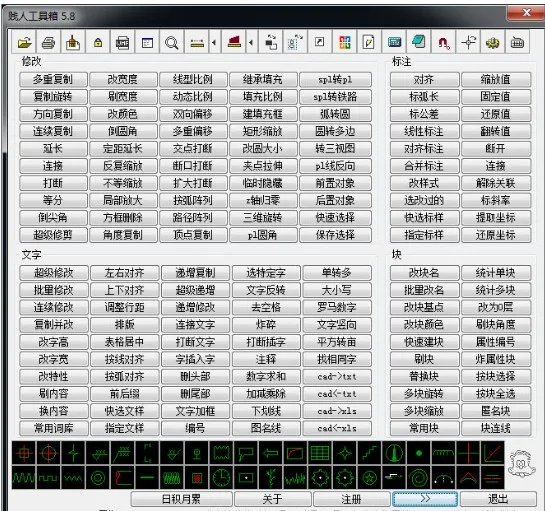
The Bitch Toolbox is an outstanding plugin for the AutoCAD platform, featuring 200 practical tools that can boost your drawing efficiency by over 30%. It is compatible with AutoCAD versions 2000 through 2012 and beyond. The plugin supports 32-bit operating systems including Windows 2000, XP, 2003, Vista, and Windows 7, but it does not support 64-bit systems. No installation is required—simply load the plugin to use it. This green software does not require any modifications to your CAD system settings!
Instructions for Use
1. Loading the Plugin
(1) Open AutoCAD, then go to the menu: Tools > Load Application to open the dialog box.
(2) Click Contents… in the startup group of the dialog box, then click Browse. Locate the toolbox file, click Add, and then close the dialog box.
(3) Restart AutoCAD.
(4) Enter the command y to load the toolbox.
2. Troubleshooting Loading Issues
(1) Make sure you are logged into your operating system as an administrator.
(2) If you are using Windows Vista or Windows 7, disable User Account Control (UAC). You can search online for instructions on how to do this. After disabling UAC, restart your computer.
(3) Note that simplified versions of CAD are not supported.
3. Loading Bitch Toolbox for Tianzheng Users
(1) Identify the path where your toolbox is stored. For example, if the toolbox file is named Bitch Toolbox.vlx and is located in the root directory of the C drive.
(2) Locate the installation directory for ACADDOC.LSP in Tianzheng. Open this file and add the following line at the end (including parentheses):
(load "C:Bitch Toolbox.vlx")
(3) Restart Tianzheng and verify if the toolbox loads successfully.
(4) If your toolbox is stored in a different location, for example, the 123 folder on the D drive, modify the line accordingly:
(load "D:123Bitch Toolbox.vlx")












Must log in before commenting!
Sign Up