

Update on September 30, 2018: The latest version is V1.2.2843, supporting Revit 2016, 2017, and 2018. For detailed updates, please click here.
Update on October 11, 2018: The latest version is V1.2.2949, compatible with Revit 2016, 2017, and 2018 platforms.
New features and optimizations:
- Added explanatory text for each component BOM table. When exporting to Excel, explanatory text will appear in the footer when printing.
For specific updates, please check here.
Update on May 17, 2019: The latest version is V2.1.5354, now supporting four platforms: Revit 2016, 2017, 2018, and 2019.
About BeePC Software
BeePC is currently the first assembly-based intelligent BIM deepening software developed on the Revit platform in China. This BIM software includes built-in specifications and drawings that guide users through assembly-based deepening design during modeling.
Main Features
BeePC offers visual operation, foolproof modeling, intelligent numbering, one-click drawing, automatic generation of component detail lists (including steel bar shapes and sizes), and one-click creation of factory BOM tables. Additional user-friendly and efficient features continue to be added to help users learn assembly, BIM+PC modeling, and standardized drawing output with ease.
Trial Instructions
- Supports Revit versions from 2016 to 2019.
- Currently includes prefabricated panels, beams, stairs, columns, shear inner walls, and sandwich shear outer wall components.
- Each account is bound to one computer.
- After downloading, users can register an account with their phone number for a 15-day free trial (internet connection required). If the trial period expires, users can complete their personal information to extend the trial for another 15 days, or publish posts on forums and websites to further extend the trial. Please contact Wanwu Technology staff for details.
Main Functional Modules
1. Laminated Board
- Import CAD base lines and Revit system boards to automatically create composite panels.
- Intelligent splitting and batch generation of laminated panels.
- Batch corner cutting and automatic steel bar cutting.
- Supports opening and reinforcement bar settings, with flexible truss configuration.
- Multiple numbering methods to satisfy different requirements.
2. Composite Beam
- Flexible steel bar settings with precise positioning and space avoidance.
- Supports multiple keyway shapes to meet project specifications.
- Supports primary and secondary beam handover settings.
- Supports positioning and layout of pre-embedded conduits and pipeline openings.
- Easy statistics for hanging nails, lifting rings, and embedded nuts.
3. Prefabricated Staircase
- Built-in parametric families allowing one-step modeling and reinforcement.
- Flexible options for picking ears, hanging parts, anti-slip grooves, and drip lines.
- Color and material customization for components and reinforcement.
- Flexible switching and arrangement of top and side embedded parts.
- Open and customizable embedded part parameters.
4. Prefabricated Wall
- Four interior wall types with interface linkage switching, managed within one family.
- Reinforcement logic series connection and batch modification to improve modeling efficiency.
- Support for wire boxes, openings, embedded nuts, and perforations.
- Point changes, software reclassification, and one-click fast numbering.
- Multiple numbering styles and sequences with flexible selection.
5. Sandwich Exterior Wall Module
- Multiple canvas interfaces with flexible parameter adjustments.
- Straight reinforcement at connecting beams with free 1:6 bending settings.
- Separate horizontal bars on both sides to control output, meeting design requirements.
- Supports flexible settings such as insulation ties and lightweight filling materials.
- Supports hole openings in the outer plate and reinforcement bar settings for these holes.
6. Prefabricated Columns
- Flexible selection of grouting sleeves with parameter modification and model linkage.
- Flexible selection of column embedded parts with parameter modification and model linkage.
- Multi-sided switching of wire boxes and embedded nuts for precise positioning.
- Intelligent layout of outlets and grouting ports with manual adjustment options.
- Pre-embedded parts are selected based on load, with timely feedback and adjustments.
7. Balcony Board
- Three balcony types with free switching between left and right edge sealing.
- Various steel bar types with adjustable bending hook forms.
- Support for embedded railing layouts, openings, and wire boxes.
- Arrangement support for various additional steel bars.
- Embedded parts support parameter adjustments.
8. BeePC Design Series Features
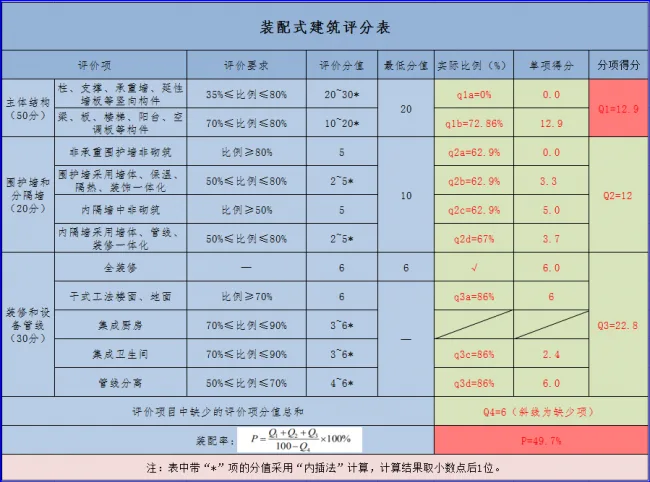
Supports the national standard GB/T 51129-2017 and gradually enables assembly rate calculations for Zhejiang Province, Hunan Province, Chongqing City, Anhui Province, Shanghai, Jiangsu, Ningbo, and other regions. Combined with “filtering selection,” it facilitates batch classification of components. Selected components display necessary parameter information for assembly rate calculations, which can be adjusted for specific parameter results.














Must log in before commenting!
Sign Up