
Dynamo is a powerful tool for Revit, offering functionality beyond what is available in Revit’s API. You might wonder if it’s possible to directly use Dynamo’s classes within your projects. The answer is yes!
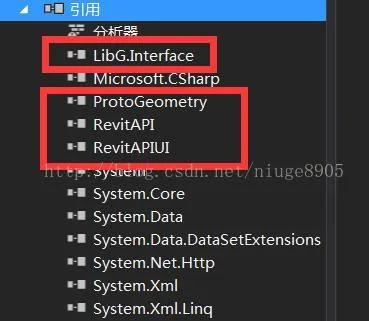
Step 1: In your development references, include the DLL files ProtoGeometric.dll and LibG.Interface.dll. These files are part of Dynamo’s installation package and provide access to its core classes, opening up many possibilities for advanced functionality.
Step 2: Ensure that Dynamo is running when you execute your plugin, as it needs to be active for the integration to work correctly.

xuebim
Follow the latest BIM developments in the architecture industry, explore innovative building technologies, and discover cutting-edge industry insights.
← Scan with WeChat














Must log in before commenting!
Sign Up