
First, let’s review a blog post titled: IronPython uses SQL Server database.
Our Dynamo Python Script environment is essentially a form of IronPython, which integrates seamlessly with databases, especially when combined with the methods discussed in the blog above.
In my previous article, I demonstrated how to read the appearance properties of materials and store them in a SQL Server database. Today, I will modify that approach by encapsulating the reading process into a DLL file, allowing most of the work to be completed within the Python Script environment.
We will make slight adjustments to MyClass, transforming it into the class shown in the image below, while leaving the ReadAssetPropelity class unchanged.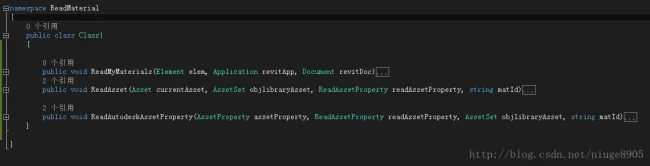
Next, complete the code implementation in the Python Script environment as shown below: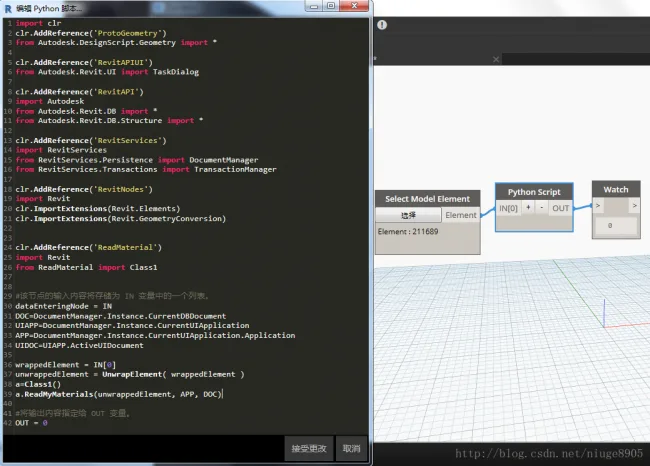
Pay special attention to this snippet, which converts elements recognized by Dynamo into a format readable by the Revit API:
wrappedElement = IN[0]
unwrappedElement = UnwrapElement(wrappedElement)
Finally, the data was successfully transmitted and imported into SQL Server, as demonstrated below.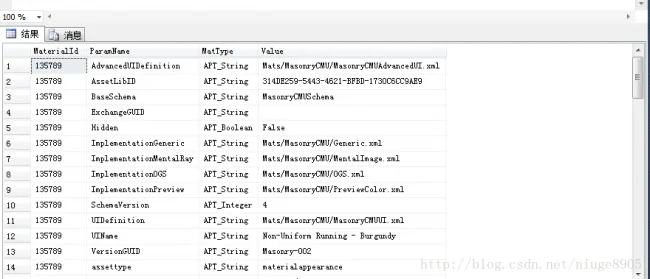















Must log in before commenting!
Sign Up