
Setting text fonts in Revit’s secondary development is relatively straightforward thanks to the available APIs.
First, you need to obtain the system font name. Here’s a simple way to do that:
https://zhidao.baidu.com/question/69549353.html
Once you have the system font name, you can apply it in Revit’s API like this:
textNoteType.get_Parameter(BuiltInParameter.TEXT_FONT).Set("宋体");
This sets your text style to the Song typeface.
Next, let’s discuss some peculiar issues related to text rendering in Revit.
To start, Chinese characters are typically twice as wide as English letters, which is expected.

Now, the second issue concerns inconsistent text heights:
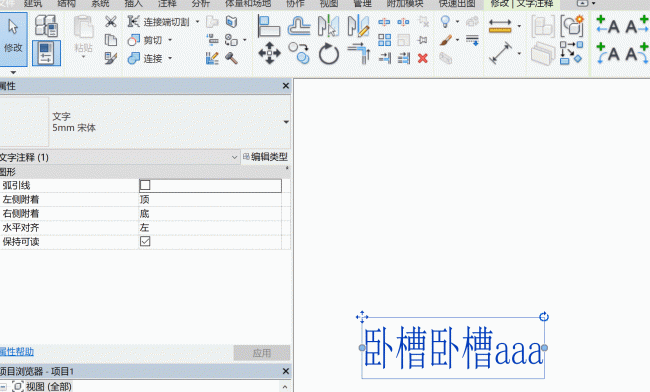
This example shows a 5mm Song typeface with a width factor of 0.7. Ignoring the 1:100 scale, the actual height and width exceed 5mm and 3.5mm respectively, which is unreasonable. How does this compare to font sizes in CAD or Word? Even more frustrating, different fonts have completely different width and height dimensions.
System.Windows.Forms.Control control = new System.Windows.Forms.Control();
System.Drawing.Graphics g = control.CreateGraphics();
System.Drawing.SizeF sizeFOrigin = g.MeasureString("宋", new System.Drawing.Font("宋体", 5));
System.Drawing.SizeF sizeF = g.MeasureString(titleTextSet.Font, new System.Drawing.Font(titleTextSet.Font, 5));
g.Dispose();
double r1 = 1.48 * (sizeF.Width / sizeFOrigin.Width); // width coefficient
double r2 = 1.8 * (sizeF.Height / sizeFOrigin.Height); // height coefficient
In practice, only one font needs to be measured accurately. Here, Song typeface is used. For a 5mm font, the actual font height measures about 9mm, which corresponds to a coefficient of 1.8. The width coefficient is 0.7, and the final width factor is multiplied by 1.48. For other fonts, the MeasureString method is used to calculate relative coefficients compared to the Song typeface, enabling precise control over text height and width.
Once the size is controlled, determining the font size becomes simpler. Since Revit does not explicitly define font sizes, you need to convert them manually. Below is a reference table for corresponding font sizes.
Note: The above code has not been professionally tested, so further refinement and testing are recommended.
http://www.360doc.com/content/18/0201/14/48110419_726936679.shtml















Must log in before commenting!
Sign Up