
Navisworks and Tabletop’s cloud browsers both offer user-friendly 3D measurement tools. However, measuring the distance between two objects in 3D within Revit can be quite cumbersome. To address this, I explored a solution through Revit’s API and developed a secondary tool.
In Revit’s API, the ReferenceIntersector class allows you to find intersecting geometric entities within a 3D view by specifying a point and a direction vector. My approach leverages this class to implement simple 3D measurement functionality.
The process begins with the user selecting a point on an element. By default, the measurement direction is upward. If the selected point lies on a planar surface, the measurement direction is adjusted to follow the normal vector of that plane. Once a second intersecting point is found, a model line is created between the two points, and the distance is displayed in a pop-up window.
Here are some important considerations:
- When constructing the
ReferenceIntersector, you must apply a filter to exclude the body of the initially selected element. Otherwise, the first detected element will be the same element with a distance of zero. - Measurements on elements within linked models require special handling. Since you cannot directly obtain geometric faces via references from linked elements, you need to extract their geometric information first.
- Similarly, loadable families require accessing their geometric information to retrieve accurate faces, as faces accessed through references correspond only to the family type geometry.
- Initially, I used the
IsInsidemethod to identify intersecting faces, but it sometimes produced errors. Ultimately, I determined intersecting faces by verifying that the distance from the point to the face is zero.
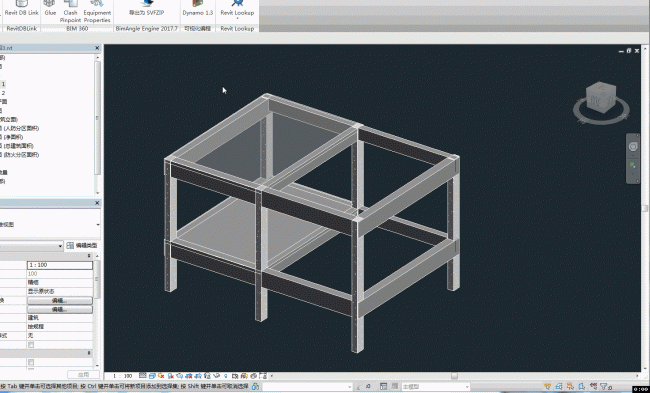
Below is the relevant code snippet demonstrating this approach:
public Result Execute(ExternalCommandData commandData, ref string message, ElementSet elements)
{
    UIDocument uidoc = commandData.Application.ActiveUIDocument;
    Document doc = uidoc.Document;

    // User selects a point on an element
    Reference ref_point = uidoc.Selection.PickObject(Autodesk.Revit.UI.Selection.ObjectType.PointOnElement);
    XYZ point1 = ref_point.GlobalPoint;

    // Default ray direction and working plane normal vector
    XYZ rayDirection = XYZ.BasisZ;
    XYZ skVector = XYZ.BasisX;

    // If the selected point is on a planar face, adjust the ray direction accordingly
    if (ref_point.ElementReferenceType == ElementReferenceType.REFERENCE_TYPE_SURFACE)
    {
        PlanarFace pFace = null;

        // If the element is from a linked model, retrieve the planar face via geometry extraction
        if (ref_point.LinkedElementId.IntegerValue != -1)
        {
            RevitLinkInstance linkIns = doc.GetElement(ref_point) as RevitLinkInstance;
            Document linkDoc = linkIns.GetLinkDocument();
            Element linkElem = linkDoc.GetElement(ref_point.LinkedElementId);
            Options opt = new Options() { DetailLevel = ViewDetailLevel.Fine };
            GeometryElement geomElem = linkElem.get_Geometry(opt);
            pFace = GetTarFace(geomElem, point1);
        }
        else
        {
            // For local elements, handle families and others differently
            Element elem = doc.GetElement(ref_point);
            if (elem is FamilyInstance)
            {
                Options opt = new Options() { DetailLevel = ViewDetailLevel.Fine };
                GeometryElement ge = elem.get_Geometry(opt);
                pFace = GetTarFace(ge, point1);
            }
            else
            {
                pFace = elem.GetGeometryObjectFromReference(ref_point) as PlanarFace;
            }
        }

        // Update ray direction and working plane vector based on the planar face's normal and X vector
        if (pFace != null)
        {
            rayDirection = pFace.FaceNormal;
            skVector = pFace.XVector;
        }
    }

    // Access the active 3D view
    View3D v3d = doc.ActiveView as View3D;

    // Create an exclusion filter to ignore the initially selected element and linked element
    ExclusionFilter filter = new ExclusionFilter(new ElementId[] { ref_point.ElementId, ref_point.LinkedElementId });

    // Initialize ReferenceIntersector for measurement
    ReferenceIntersector refIntersector = new ReferenceIntersector(filter, FindReferenceTarget.All, v3d)
    {
        FindReferencesInRevitLinks = true
    };

    // Find the nearest intersecting reference along the ray direction
    ReferenceWithContext rwc = refIntersector.FindNearest(point1, rayDirection);

    if (rwc != null)
    {
        XYZ point2 = rwc.GetReference().GlobalPoint;

        // Create a model line between the two points
        Line line = Line.CreateBound(point1, point2);

        // Display the distance in millimeters with two decimal places
        TaskDialog.Show("Distance",
            Math.Round(UnitUtils.ConvertFromInternalUnits(line.Length, DisplayUnitType.DUT_MILLIMETERS), 2).ToString());

        using (Transaction tran = new Transaction(doc, "Create Model Line"))
        {
            tran.Start();

            SketchPlane sk = SketchPlane.Create(doc, commandData.Application.Application.Create.NewPlane(skVector, point1));
            ModelCurve modelCurve = doc.Create.NewModelCurve(line, sk);

            tran.Commit();
        }
    }
    else
    {
        TaskDialog.Show("Result", "No element detected");
    }

    return Result.Succeeded;
}

/// <summary>
/// Finds the planar face intersecting with the given point within a geometry element.
/// </summary>
/// <param name="geometryElement">The geometry element to search.</param>
/// <param name="point">The point to test against.</param>
/// <returns>The intersecting planar face or null if none found.</returns>
PlanarFace GetTarFace(GeometryElement geometryElement, XYZ point)
{
    PlanarFace face = null;

    foreach (GeometryObject geomObj in geometryElement)
    {
        Solid solid = geomObj as Solid;

        if (solid != null && solid.Faces.Size > 0)
        {
            foreach (Face f in solid.Faces)
            {
                PlanarFace pFace = f as PlanarFace;

                if (pFace != null)
                {
                    try
                    {
                        if (Math.Round(pFace.Project(point).Distance, 2) == 0)
                        {
                            face = pFace;
                            break;
                        }
                    }
                    catch
                    {
                        continue;
                    }
                }
            }

            if (face != null)
                break;
        }
    }

    if (face == null)
    {
        foreach (GeometryObject geomObj in geometryElement)
        {
            GeometryInstance geomIns = geomObj as GeometryInstance;

            if (geomIns != null)
            {
                face = GetTarFace(geomIns.GetInstanceGeometry(), point);
            }
        }
    }

    return face;
}














Must log in before commenting!
Sign Up