
When working on projects, it’s common to encounter situations where architectural and structural disciplines model simultaneously. In such cases, the structural model might not be fully complete, resulting in wall heights modeled from elevation to elevation instead of from the actual board surface to the bottom of the board or beam. Therefore, we need to wait for the structural model’s completion before making adjustments.
Although adjusting wall heights is relatively straightforward, it is highly repetitive and labor-intensive. To optimize this process, we implemented a secondary development approach.
The core logic involves selecting several points at half the wall’s height and detecting the floor and beam surfaces above and below these points. If a corresponding face is detected, the distance is obtained to calculate the wall’s top and bottom offsets, then the wall parameters are adjusted accordingly.
The most challenging aspect is selecting the points. The API does not provide a direct method to obtain online parameter points, so this must be implemented manually. Additionally, the two endpoints of the wall path cannot be selected because doing so causes overly sensitive detection and misidentification of adjacent element faces.
Example:
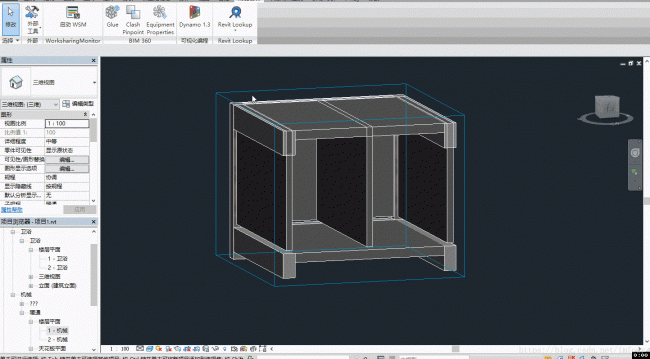
Code:
class ModifyWallOffset : IExternalCommand
{
public Result Execute(ExternalCommandData commandData, ref string message, ElementSet elements)
{
UIDocument uidoc = commandData.Application.ActiveUIDocument;
Document doc = uidoc.Document;
// Run in 3D view
View3D view = doc.ActiveView as View3D;
// Select walls
var elems = uidoc.Selection.PickElementsByRectangle(new AWallSelection(), "Select the wall to be modified in the box");
// Enable transaction
using (Transaction tran = new Transaction(doc, "Fix Wall"))
{
tran.Start();
// Traverse elements
foreach (Wall wall in elems)
{
// Skip locked walls
if (!wall.Pinned)
{
// Parameters: Top offset, unconnected height, bottom offset
Parameter wallTopOffset = wall.get_Parameter(BuiltInParameter.WALL_TOP_OFFSET);
Parameter wallHeight = wall.get_Parameter(BuiltInParameter.WALL_USER_HEIGHT_PARAM);
Parameter wallBaseOffset = wall.get_Parameter(BuiltInParameter.WALL_BASE_OFFSET);
try
{
// Create ray tool for distance calculation
RayTool rt = new RayTool(doc, wall, view);
// Initial wall height and base offset
double height = wallHeight.AsDouble();
double baseOffset = wallBaseOffset.AsDouble();
// Calculate correct wall height and base offsets
switch (rt.ReturnState)
{
// Both top and bottom distances found
case 2:
baseOffset = height / 2 + baseOffset - rt.BaseDistance;
height = rt.TopDistance + rt.BaseDistance;
break;
// Only top distance found
case 1:
height = height / 2 + rt.TopDistance;
break;
// Only bottom distance found
case -1:
baseOffset = height / 2 + baseOffset - rt.BaseDistance;
height = height + wallBaseOffset.AsDouble() - baseOffset;
break;
}
// Adjust wall parameters
if (wallTopOffset.IsReadOnly)
{
wallHeight.Set(height);
}
else
{
wallTopOffset.Set(height + baseOffset - wallHeight.AsDouble() - wallBaseOffset.AsDouble() + wallTopOffset.AsDouble());
}
wallBaseOffset.Set(baseOffset);
}
catch
{
// Handle errors silently or log them as needed
}
}
}
tran.Commit();
}
return Result.Succeeded;
}
}
// Wall selection filter
class AWallSelection : Autodesk.Revit.UI.Selection.ISelectionFilter
{
public bool AllowElement(Element elem)
{
if (elem is Wall)
{
return true;
}
return false;
}
public bool AllowReference(Reference reference, XYZ position)
{
return false;
}
}
// Distance detection using raycasting
class RayTool
{
public RayTool(Document document, Wall wall, View3D view3D)
{
// Radiation filter
IList filterList = new List ();
ElementCategoryFilter filter1 = new ElementCategoryFilter(BuiltInCategory.OST_Floors);
filterList.Add(filter1);
ElementCategoryFilter filter2 = new ElementCategoryFilter(BuiltInCategory.OST_StructuralFraming);
filterList.Add(filter2);
ElementCategoryFilter filter3 = new ElementCategoryFilter(BuiltInCategory.OST_Ceilings);
filterList.Add(filter3);
LogicalOrFilter filter = new LogicalOrFilter(filterList);
// Create rays
ReferenceIntersector referenceIntersector = new ReferenceIntersector(filter, FindReferenceTarget.Face, view3D);
referenceIntersector.FindReferencesInRevitLinks = true;
// Initialize distances
TopDistance = 0;
BaseDistance = 0;
foreach (XYZ p in GetRayOriginPoints(wall, 5))
{
ReferenceWithContext rwc0 = referenceIntersector.FindNearest(p, new XYZ(0, 0, 1));
if (rwc0 != null)
{
double distance = rwc0.Proximity;
if (distance > TopDistance) TopDistance = distance;
}
ReferenceWithContext rwc1 = referenceIntersector.FindNearest(p, new XYZ(0, 0, -1));
if (rwc1 != null)
{
double distance = rwc1.Proximity;
if (distance > BaseDistance) BaseDistance = distance;
}
}
}
///
/// Get a list of points used for raycasting
///
/// The wall to measure
/// Number of points (less or equal to this)
/// GetRayOriginPoints(Wall wall, int pointNumber)
{
// Obtain the wall's location curve (horizontal centerline)
Curve wallLocationCurve = (wall.Location as LocationCurve).Curve;
// Get half the wall height
double h = wall.get_Parameter(BuiltInParameter.WALL_USER_HEIGHT_PARAM).AsDouble() / 2 + wall.get_Parameter(BuiltInParameter.WALL_BASE_OFFSET).AsDouble();
IList originPoints = new List ();
double pointParameter = 0.05;
XYZ p = PointAtParameter(pointParameter);
originPoints.Add(new XYZ(p.X, p.Y, p.Z + h));
double pace = (0.95 - pointParameter) / (pointNumber - 1);
for (int i = 0; i < pointNumber - 1; i++)
{
pointParameter += pace;
p = PointAtParameter(pointParameter);
originPoints.Add(new XYZ(p.X, p.Y, p.Z + h));
}
return originPoints;
// Helper function: get point along the curve at parameter
XYZ PointAtParameter(double parameter)
{
XYZ p1, p2;
Line line = wallLocationCurve as Line;
if (line != null)
{
p1 = line.GetEndPoint(0);
p2 = line.GetEndPoint(1);
return new XYZ(p1.X + parameter * (p2.X - p1.X), p1.Y + parameter * (p2.Y - p1.Y), p1.Z + parameter * (p2.Z - p1.Z));
}
else
{
Arc arc = wallLocationCurve as Arc;
if (arc != null)
{
p1 = arc.GetEndPoint(0);
p2 = arc.GetEndPoint(1);
XYZ c = arc.Center;
double r = arc.Radius;
XYZ v1 = new XYZ(p1.X - c.X, p1.Y - c.Y, p1.Z - c.Z);
XYZ v2 = new XYZ(p2.X - c.X, p2.Y - c.Y, p2.Z - c.Z);
double angle = v1.AngleTo(v2) * parameter;
if (arc.Normal.Z == -1) angle = -angle;
double x1 = c.X + (p1.X - c.X) * Math.Cos(angle) - (p1.Y - c.Y) * Math.Sin(angle);
double y1 = c.Y + (p1.X - c.X) * Math.Sin(angle) + (p1.Y - c.Y) * Math.Cos(angle);
return new XYZ(x1, y1, c.Z);
}
}
return null;
}
}
public int ReturnState
{
get
{
if (TopDistance > 0 && BaseDistance > 0)
{
return 2;
}
else if (TopDistance > 0 && BaseDistance <= 0)
{
return 1;
}
else if (TopDistance <= 0 && BaseDistance > 0)
{
return -1;
}
else
{
return 0;
}
}
}
public double TopDistance { get; }
public double BaseDistance { get; }
}
After applying this method in a project, the results have been positive with no major issues in common areas. However, problems can arise in cases of building settlement or intersections with structural beams and slabs where beams of different heights meet.
These areas require manual correction by editing the wall profile. Therefore, it’s important to consider detecting these intersecting zones and automatically adjusting the wall profile accordingly.
On a related note, I’ve also started thinking about challenges with sloped slabs and beams. For now, this is a topic to explore later when time permits.















Must log in before commenting!
Sign Up