
Let’s first address this issue: REVIT exports NWC files to resolve the problem of “not finding suitable geometric shapes” during export.
The key points to consider are:
(1) Selection of the current view
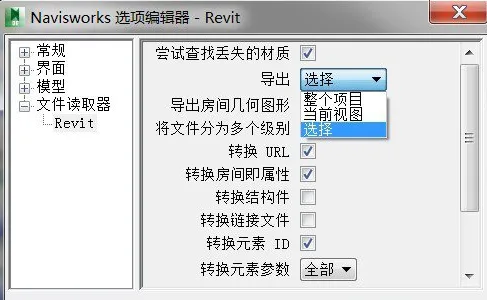
(2) Export method settings
For view selection, you must use the default 3D view. In some cases, you may need to try other 3D views in the Revit Properties window, especially if you have created custom views.
Regarding the export method, setting it to “select” without choosing any components will not work. Instead, change the export method to the one that fits your needs.

xuebim
Follow the latest BIM developments in the architecture industry, explore innovative building technologies, and discover cutting-edge industry insights.
← Scan with WeChat















Must log in before commenting!
Sign Up