
Olive Mountain Version 6.1 Adds 37 New Features: Complete Mold Flipping in Revit and Faster Mechanical & Electrical BIM Modeling
Introduction:
Olive Mountain is about to release version 6.1 to its extensive user base. This update introduces over 30 new features, including more than 20 annotation and editing tools focused on mechanical and electrical disciplines. A notable enhancement is the addition of a new method for mold flipping via linked drawings in Revit. Furthermore, several practical utilities have been added, and numerous issues from previous versions have been resolved. Let’s explore these new tools and see which ones might benefit your workflow!
1. Hide Tab Tool
As Revit continues to grow in popularity, the market is flooded with plugins. Many BIM professionals install multiple plugins to support their daily tasks, but often only use a handful of tools regularly. This can clutter the ribbon area and sometimes even obscure Revit’s native tabs. To address this, Olive Mountain 6.1 introduces the “Hide Tab” feature, allowing users to hide seldom-used plugin tabs and better manage the ribbon interface.
2. Overlapping Dimension Avoidance
When marking third dimension lines during drafting, overlapping annotations are a common issue. Manually adjusting these is time-consuming and tedious. The new version offers a tool that automatically avoids overlapping annotation text, significantly reducing manual corrections.
3. Pipeline Annotation Tools
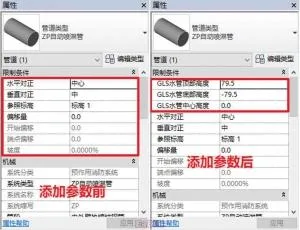
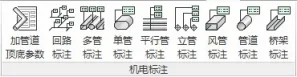
Annotating pipelines in electromechanical models often involves labeling the top, center, and bottom heights of pipes. However, since pipeline families lack built-in height parameters, direct annotation is challenging. Olive Mountain 6.1 adds a tool to insert top and bottom height parameters into pipelines, facilitating easy height annotation. Alongside this, new annotation tools such as “Multi-pipe Annotation,” “Parallel Pipe Annotation,” and “Vertical Pipe Annotation” enable fast and batch labeling of pipelines, streamlining mechanical and electrical modeling.
4. Olive Mountain Mold Flipping
Version 6.1 introduces a new mold flipping method that works through linked drawings in Revit, simplifying the process of flipping drawings already linked to your project.
5. Continuous Pipe Avoidance
This new feature allows continuous pipelines to automatically avoid all obstacles encountered along their path. Users can customize the avoidance direction, angle, and distance, greatly enhancing pipe routing efficiency.
6. Equipment Connection Tools
After placing equipment components, connecting them to pipelines is often a manual and repetitive task. The default Revit tools don’t support batch operations. Olive Mountain 6.1 addresses this by providing batch connection tools for equipment such as air vents, nozzles, fire hydrants, and fan coil units, making pipeline-to-equipment connections faster and more convenient.
Version 6.1 Update Highlights:
- Added a tab hiding tool to show or hide any ribbon tab.
- Introduced a size value modification tool for customizing annotation values.
- Implemented annotation text avoidance to reposition overlapping texts automatically.
- Added a multi-layer co-located component selection tool for components across multiple floors.
- Enhanced drawing name correction tool for batch renaming of drawings.
- Enabled flipping of DWG drawings linked to buildings, structures, and pipelines, including grids, walls, beams, columns, doors, windows, and mainly sprinkler or general pressure pipelines.
- Added a multi-pipe drilling tool to merge and drill multiple pipes that run parallel or close together.
- Introduced a hole marking tool to label drilled pipes and holes.
- Added an equidistant tool for inclined plates to batch align pipes under inclined surfaces.
- Included a branch pipe height adjustment tool for sprinkler pipes with automatic riser creation.
- Added a pipeline attachment deletion tool to remove attachments and reconnect pipelines automatically.
- Introduced a continuous pipe growth avoidance tool for automatic obstacle avoidance.
- Expanded air vent connection tools with batch, side, elbow, T, and cross connection options.
- Added nozzle connection functionality.
- Included fire hydrant connection tools.
- Added fan coil unit connection tools.
Improvements to Existing Features:
- Optimized the one-click deduction tool with local selection and linked model support.
- Enhanced structural flipping accuracy.
- Improved the fine filtering tool with family name display.
- Refined the Liangqi inclined plate tool.
- Upgraded beam top pressing and ring beam tools for independence from main body, facilitating model splitting.
- Fixed various other issues.














Must log in before commenting!
Sign Up