
Fuzor 2017 Official Release
Following the official update activation mechanism, the Chinese version has been cracked by forum experts. The new Fuzor 2017 introduces essential new tools tailored for the construction industry. This software is a virtual implementation system designed specifically for architectural engineering and design. You can download Fuzor 2017 from this website.
Installation Guide:
1. Run the installation package (installation password: 52pojie)
2. Follow the on-screen instructions to complete installation.
3. After installation, copy the file “fuzor.exe” to the installation directory to experience Fuzor 2017. The default path is: C:Program FilesFuzor 2017 Virtual Design Construction
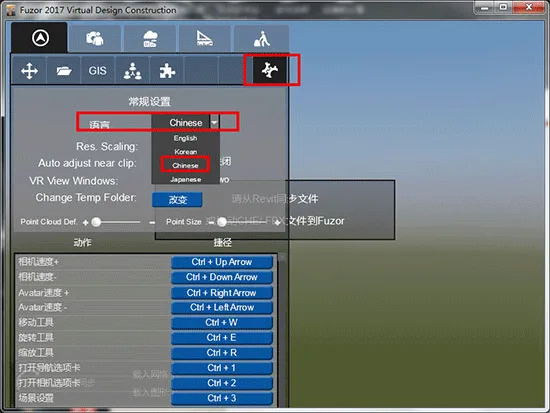
4. The software defaults to an English interface. To switch to Chinese, open the program, go to Settings, and select Chinese under the language options.

About Fuzor 2017:
Fuzor 2017 is a BIM virtual implementation system developed by Kalloc Studios in the USA. It was the first to introduce multiplayer game engine technology into the construction industry and holds an exclusive patent for two-way real-time seamless connection. While Fuzor can function as a VR plugin for Revit, its capabilities extend far beyond VR, offering a unique user experience unmatched by similar software.
This release represents a groundbreaking advancement: it not only provides real-time virtual reality scenes but also instantly converts BIM model data into a highly compatible, game-like environment. More importantly, it preserves complete BIM information, enabling all project participants to connect to the model over a network for collaborative communication within this virtual space. This allows users to “do BIM while playing games,” making work both engaging and efficient.
Key Features of Fuzor 2017:
Enhanced Compatibility
Fuzor 2017 has improved integration with ArchiCAD, supporting bidirectional real-time synchronization, and added connectivity with Rhino via unidirectional synchronization. Given the expanding variety of tools in the AEC industry, coordination among them can be challenging. Fuzor addresses this by enabling the merging of models from multiple software into a single project, maximizing compatibility.
Issue Tracking System
An effective issue tracking system is crucial for any project. Fuzor 2017 offers an advanced system that automatically tracks issues and feedback between mobile and PC devices. Issues can be stored on private or public cloud servers, with authorized users able to view or modify them anytime. The software supports iPad Pro’s stroke pressure system, expanding project management capabilities. Users can take screenshots, add annotations, write comments, and capture on-site photos to reduce errors and showcase professionalism to clients.
Audio Playback for Components and Scenes
While 3D visualization enhances project viewing, it often lacks environmental audio. Fuzor 2017 introduces audio properties for components, allowing you to assign sound files to specific objects. This lets clients hear natural sounds like rustling trees or the difference in footsteps when moving from hard floors to soft surfaces, creating a more immersive VR experience.
Support for Point Cloud Data
Point cloud data helps designers recreate real-world environments realistically. Fuzor 2017 supports advanced point cloud technology under the PTS framework, enabling designers to place objects or reload models within these precise environments.
VR Device Compatibility
Fuzor 2017 enhances the VR experience with improved support for Oculus Rift and added compatibility with HTC Vive. It also introduces two new VR modes: Sketch Mode and Fine Graphics Mode, enriching virtual reality workflows.
Shortcut Key Support
To speed up workflow and reduce reliance on mouse clicks, Fuzor 2017 adds customizable shortcut keys, helping users save time and work more efficiently.
CHL Cache File Linking System
Large BIM project files can slow down computers and complicate model management. Fuzor 2017 addresses this with a cache file linking system, allowing multiple cache files to be loaded into a single main model for smoother operation.
Improved Graphics Performance
Virtual reality demands high graphical standards, including realistic lighting, atmospheric effects, and reflections. Fuzor 2017 introduces a new graphics processing system that enhances detail representation, including improved default materials, glass reflection angles, atmospheric reflections, and more.
Enhanced Vehicle and Pedestrian Path Creation
Users often want to see more than static buildings—they want vibrant, living environments. Fuzor 2017’s new system makes designing vehicle and pedestrian routes more convenient and efficient.
VR Collaborative Modification
Traditional design revision involves a lengthy cycle of model review, change proposals, redesign, and re-review. Fuzor 2017 revolutionizes this process by enabling real-time design changes in a virtual reality collaboration platform. As a host, you can modify designs while clients observe updates live, eliminating the need for repetitive, time-consuming steps.
Additional Improvements:
- MSI installation supports network deployment, facilitating multi-system installations.
- Updated to the latest DirectX 11 for enhanced performance.
- Annotation system now supports attachment uploads on both mobile and PC devices.
- Mobile app performance is smoother and more precise.
- Animation previews benefit from progressive rendering, improving navigation and resource handling.
- New atmospheric reflection processor enhances shadows, material settings, ambient occlusion, and water reflections.
- Added new terrain selection options for water areas.
- Supports editing SketchUp materials directly within Fuzor.
- Level of Detail (LOD) control reduces resolution of distant objects to improve performance on large models.
- Controller support expanded to Xbox ONE and 3D mice, with VR device compatibility.














Can’t install
Can Fuzor 32-bit computers be installed
Fuzor supports 32-bit computers, please note the corresponding version
Revit is unable to run the external application ‘Fuzor’. Please contact the vendor for assistance. May I ask where the problem lies?
The default directory for Fuzor is C: Program Files Fuzor 2017 Virtual Design Construction