
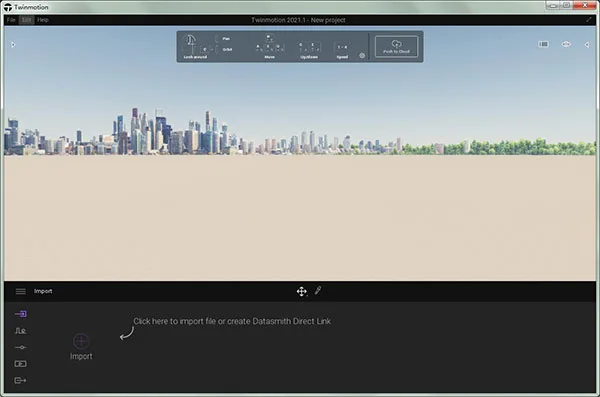
Twinmotion Chinese version is a powerful 3D graphic modeling software designed for professionals. The official Twinmotion 2021 release is built on Unreal Engine, offering advanced rendering capabilities and broad compatibility. It is ideal for industries such as architecture, engineering, urban planning, and landscape design.
Twinmotion 2021 enhances overall performance and stability, refines automatic exposure and floodlight settings, and delivers a more efficient user experience. Originally developed by the French architecture studio KA-RA and now in collaboration with Abvent, creators of Artlantis, this software provides architects and designers with an intuitive platform to create realistic building visualizations.
It supports importing models in standard 3D file formats including FBX, DWG, and DAE. Users can easily express ideas with simple renderings and 360-degree panoramic images, then experience the project environment through rendered animations and 360-degree rotation animations. The unique VR technology offers an immersive 3D experience. Unlike traditional rendering software that may take hours to export media, Twinmotion completes this in seconds.
With Twinlinker, you can quickly create and share online panoramic projects. Simply export Twinmotion media to Twinlinker and connect various media to build an interactive online presentation.
The latest Twinmotion 2021 version introduces many upgrades and optimizations. It features a new interactive VR interface that allows users to adjust weather, time, and materials within virtual reality projects, offering a fully immersive 3D design experience. It supports nearly all popular 3D modeling software with direct import options for FBX, SKP, C4D, and OBJ formats.
User interface improvements include a new title panel with integrated navigation tools and a button to export projects directly to the presenter cloud, helping new users get started quickly. Combined with an intuitive icon-based interface and the power of Unreal Engine, Twinmotion is perfectly suited for professionals in architecture, construction, urban planning, and landscape design.
The software also updates the core geometry data structure, enhancing performance and stability, making it an ideal rendering solution for designers.
Twinmotion 2021 Installation and Setup Guide
1. Download and unzip the Twinmotion 2021 package. The software comes pre-cracked and is ready to run immediately.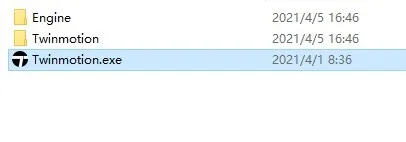
2. Upon launching, the interface defaults to English. Begin by adjusting the settings.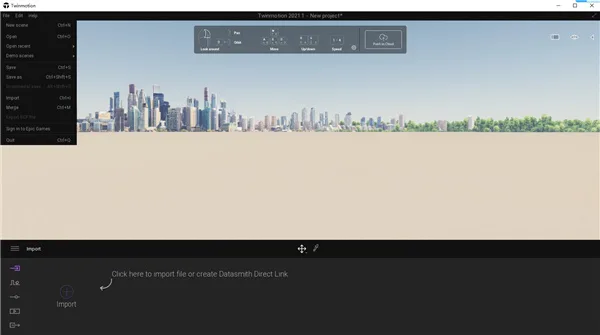
3. Click the three-bar menu and select ‘Preferences’ to open the settings panel.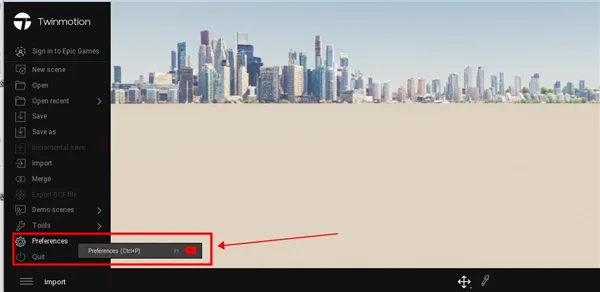
4. Choose the ‘Appearance’ tab, find the ‘Language’ option, select Chinese, and click OK.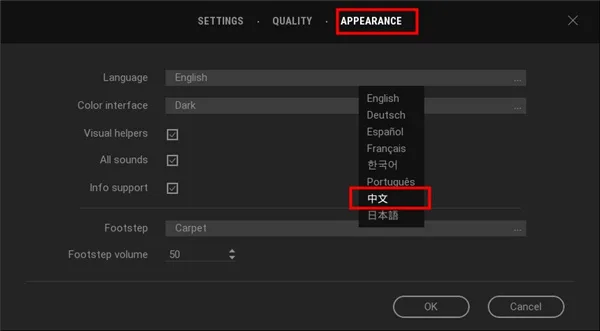
5. This completes the Chinese language installation and setup for Twinmotion 2021.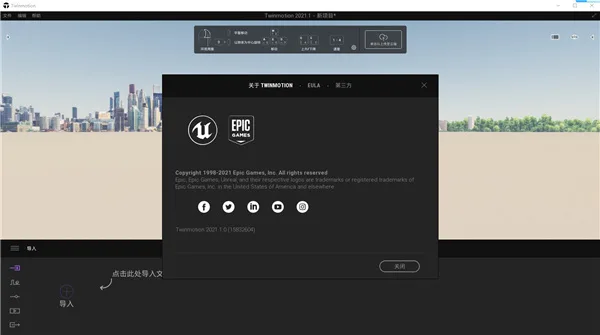
Key Features of Twinmotion
1. Unmatched Real-Time Quality
View and edit your scenes with real-time rendering quality comparable to final outputs. Twinmotion offers physics-based realistic lighting with global illumination and shadows. It includes over 600 PBR materials that interact with the environment and supports effects like depth of field, lens flare, and halos, enabling you to achieve stunning visual results easily.
2. Easy to Learn and Use
The clean and intuitive interface makes Twinmotion accessible to users of all skill levels, whether your project is simple or complex. You can drag and drop lights, materials, and props, and adjust seasons, weather, and time with sliders. Smart assets like automatically opening doors and wind-swaying trees add realism effortlessly.
3. All-in-One Media Creation and Sharing
Create images, animations, panoramas, VR videos, and presentations directly from one project within seconds. The Demonstrator Cloud feature allows you to upload presentations and share them with clients via links, eliminating the need for large downloads or powerful local hardware.
4. Seamless Integration with Your Workflow
Twinmotion supports all major BIM, CAD, and 3D modeling software, syncing with most via a single click. You can also export projects to Unreal Engine for advanced editing, animation, and high-end rendering.
5. Extensive High-Quality Asset Library
Bring your scenes to life with props, sound effects, animated humans and animals, and plants that sway in the wind—all available via drag and drop. Twinmotion also integrates Quixel Megascans, providing thousands of premium 3D assets in categories like architecture, food, industry, and nature, plus high-fidelity material surfaces stored in the cloud.
6. Convenient Tools and Features
Set project geographic locations and download real-world environments from OpenStreetMap. Plan projects using white-box patterns or create sectional renderings to visualize construction stages. Quickly add roads bustling with vehicles and pedestrians. Many more features await exploration!
New Features in Twinmotion 2021
1. Unreal Engine Plugin
A new plugin enables importing Twinmotion projects directly into Unreal Editor. This extended pipeline allows architects to create initial concepts in Twinmotion and pass them to visualization experts for advanced refinement, including enhanced lighting, materials, animations, and high-quality visual outputs.
2. Demonstrator Cloud Service (Early Access)
Share projects globally with stakeholders through the new cloud service. Users can view and interact with demos running on high-end GPUs via a web browser, requiring only a basic Windows or macOS computer—ideal for remote client reviews or team collaborations.
3. Megascans Integration
Quixel Megascans 3D assets and surfaces are now fully integrated into Twinmotion’s library, giving you easy access to thousands of high-quality objects and materials stored in the cloud, reducing local storage needs.
4. Datasmith Direct Link
Support for Datasmith Direct Link now includes Revit, enabling aggregation of multiple Revit files representing different project aspects for real-time updates. Future releases will support combining files from different sources like Rhino while maintaining live link functionality.
5. New Assets Added
140 new assets enrich the library, including 20 trees from Japan and the US, 60 gym and street fitness equipment assets, and 60 new characters with various poses to add life and realism to your scenes.
6. Lighting Enhancements
Improved default and intensity settings for sun, moon, artificial lights, particles, neon vehicle lights, street lamps, and self-illuminated materials. Automatic exposure and floodlight settings are adjusted for smoother day-to-night transitions.
7. Non-Realistic Rendering Styles
Switch easily between styles like hidden lines, shaded hidden lines, wooden, metal, clay models, or default materials to highlight design elements or express technical, hand-drawn looks. These options are available in full screen mode and presenter.
8. Stage Setup in Demonstrator
Include project stages in demonstrator files to showcase construction progress sequentially, playable from any camera angle.
9. Vegetation Color Tone Adjustment
Modify overall color tones of plant stems and leaves to maintain visual harmony with other scene elements.
10. UI/UX Improvements
New title panel with integrated navigation and one-click export to presenter cloud help new users start quickly.
11. Performance Upgrades
Core geometry data structures have been optimized to boost overall performance and stability.
Advantages of Twinmotion Software
1. Automatic Exposure Adjustment
Automatically regulate camera exposure when transitioning between light and dark scenes.
2. Regional Light Source
Add rectangular light sources to illuminate large areas effectively.
3. Volumetric Lighting
“Haze” options for flood and spotlight sources simulate light interacting with airborne particles.
4. High-Quality Characters
Characters in the library are replaced with photo-scanned models, including 84 pre-posed and 62 motion-captured animated figures.
5. Vegetation Growth Visualization
Visualize tree growth over years to track landscaping evolution.
6. Vegetation Scattering Tool
Easily scatter plants on selected surfaces for natural, varied placement.
7. Grassland Fade Distance
Disable rendering of distant grass to improve frame rates.
8. Annotation Tool
Add annotations directly within project scenes to highlight details.
9. BCF Export
Import annotations back into BIM software for seamless collaboration.
Twinmotion 2021 combines user-friendly design with powerful features, making it a top choice for architectural visualization and real-time rendering professionals.












Consultation on decompression password
What is the decompression password?
What is the decompression password?