
To analyze Revit models in Navisworks, the first step is converting the Revit file into NWC format. There are two ways to perform this conversion: exporting the Revit file directly as an NWC file, or using the external tools under the add-ons to convert and open the file in Navisworks. Figure 1 illustrates both methods:
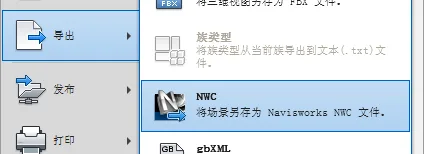
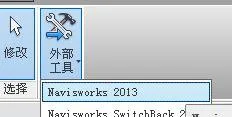
For collision detection, Autodesk Navisworks Manage 2013 is used in this example. The detection methods can be categorized into two types:
1. Local Element Collision Detection
If you want to detect collisions within specific local elements of a project, start by selecting the elements to be checked. Then, select the elements that might interfere with them, or choose elements from the entire project. Next, click Clash Detective to run the collision detection.
2. Overall Project Collision Detection
To perform collision detection across the entire project, open the view and click Clash Detective. Add a new test, select all items in categories A and B, and then run the test. Navisworks will scan for clashes across all disciplines within the project and provide a summary of collision points. If needed, you can export the results using the Write Report command, which supports XML or HTML formats.
Compared to traditional pipeline coordination on 2D drawings, using Revit MEP for pipeline synthesis offers a clear 3D visualization. This approach allows for rapid and precise identification and adjustment of conflicts, significantly enhancing both efficiency and accuracy. It also helps ensure the quality of project design and construction.
Additionally, Navisworks enables third-party users to navigate freely through the project for review or walkthrough purposes.
Once collisions are detected in Navisworks, you can modify the model in Revit accordingly, adjusting elevations and spatial arrangements of various disciplines based on established avoidance principles.
Navisworks detects numerous clashes—not only between pipelines but also design errors, such as drainage pipes improperly routed beneath rolling shutter doors. Identifying and correcting these issues improves design accuracy and overall project quality.
Source: Author: BIM Tutorial Website Source: BIM Tutorial Website
















Must log in before commenting!
Sign Up