
The data structure used in the Revit model is illustrated in Figure 1. It follows a four-level hierarchical tree structure, organized from top to bottom as Category, Family, Type, and Instance.
The highest level, Category, includes elements such as structural columns, doors, walls, ducts, pipes, cable trays, rooms, and spaces. A Family is a class of elements within a category, grouping items based on shared parameters (attributes), similar uses, and graphical representations. For example, under the structural columns category, families include circular structural columns, rectangular structural columns, and I-shaped steel structural columns. The Type refers to a subset of a family, grouping elements by parameters like size and specifications. For instance, the rectangular structural column family can be divided into types such as those with a 500mm × 500mm cross-section or those with a 450mm × 550mm cross-section. An Instance in Revit is the smallest unit in the model structure. Any individual element—such as a model, door, window, structural beam, column, mechanical equipment, or piping accessory—is considered a graphic element instance.
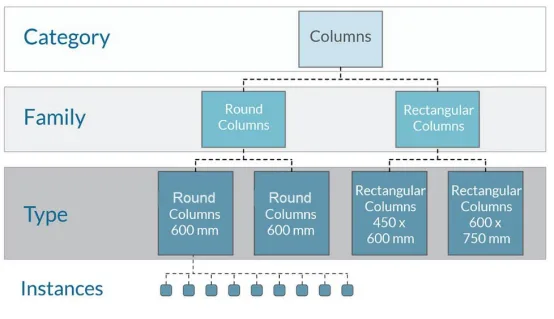
Figure 1: Revit Data Structure
All elements (instances) or their associated information within the model belong to the instance hierarchy. This includes physical entities like building components (doors, windows, etc.) and digital descriptions of building functionalities (such as rooms). Each placed instance is assigned a unique identification code. This unique ID enables easy linking of external data to building components, spaces, and equipment.
Additionally, Revit supports various predefined and customizable parameters, including Category Parameters, Family Parameters, Project Parameters, Shared Parameters, and Global Parameters. Its parametric modeling approach automatically manages the relationships between instance parameters. The horizontal relationships between parameters of individual elements and the vertical relationships among class, family, and type form the complete data structure of the Revit model. This structure also provides a practical framework for integrating building performance monitoring data with Revit models.
















Must log in before commenting!
Sign Up