
In Revit, families are categorized into three distinct types:
1. Loadable Families
Loadable families are independent files saved with the .rfa extension and can be imported into any project at any time. Revit offers family template files, enabling users to customize various family forms. Examples of loadable families include doors, windows, structural columns, and piles.
2. System Families
System families cannot be loaded or created as separate files. Instead, they are defined using the default parameters built into Revit. This category includes elements such as walls, dimensions, roofs, and floors. However, system family types can be transferred between projects using the “Project Transfer” feature.
3. Built-in Families
Built-in families are created directly within a project by the user and exist only in that specific project. They cannot be saved as separate .rfa files or transferred to other projects via the “Project Transfer” function. Unlike other family types, built-in families contain only a single type, and Revit does not allow users to duplicate or create new family types based on built-in families.
To maintain innovation and customization, many Revit design firms establish dedicated in-house teams that develop unique built-in families tailored to their projects.
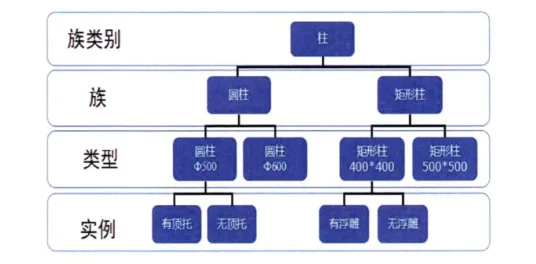
Figure 1 illustrates the relationships between family categories, families, family types, and family instances within Revit.
















Must log in before commenting!
Sign Up