
When learning Revit, you will often come across the terms “elements” and “families.” These are fundamental concepts essential to understanding and effectively using Autodesk Revit for building models.
1. Graphic Elements
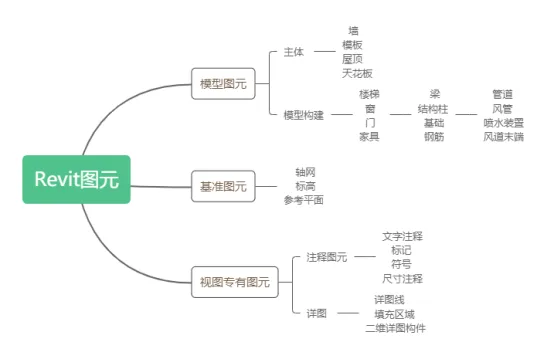
Elements refer to the defined components that make up the actual Revit model. During modeling, parameterized families are used to create new elements. Revit classifies elements into three main categories: baseline elements, model elements, and view-specific elements, as illustrated in Figure 1.
2. Families
In Revit, the concept of a family is crucial. A family represents the basic form of a graphic element. Once created and loaded into a project, it becomes a graphic element within that project. Revit families are categorized into three types: system families, loadable families, and built-in families.
(1) System Families: These are built-in families in Revit that include essential structural components like columns and beams, as well as project and system settings such as reference lines and reference planes.
(2) Loadable Families: These exist as templates within Revit and offer more flexibility than system families. They can be created and modified using the Family Editor, allowing customization to suit specific project needs.
(3) Built-in Families: These families are created directly within the current project file and serve as special components tailored to project-specific requirements.
With this overview, you should now have a solid foundational understanding of the roles and distinctions between elements and families in Revit.
















Must log in before commenting!
Sign Up