
ORD, short for OpenRoads Designer, builds upon MicroStation’s Ribbon interface and introduces the innovative NamedBoundary feature, making drawing and modeling more intuitive and efficient.
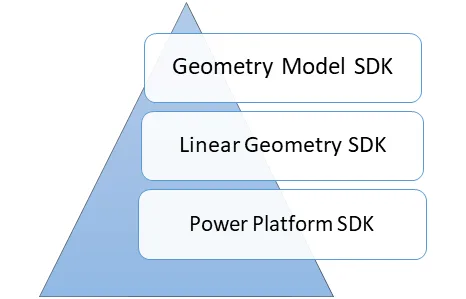
Figure 1: Development Function Overview
OpenRoads Designer (ORD) also offers an SDK (Software Development Kit), enabling developers to read information, perform geometric operations on existing models, and create custom models tailored to their needs. This toolkit provides a comprehensive set of development tools that engineers use to build applications.
ORD supports two programming languages for development: C# and C++/CLI. Its SDK is divided into three main components, as illustrated in Figure 1:
- PowerPlatform SDK: Contains the MicroStation SDK components, allowing developers to perform all MicroStation-related development tasks.
- LinearGeometry SDK: A library dedicated to route geometry calculations. It includes various linear and related algorithms used in route design such as lines, arcs, curves, B-splines, line strings, and complex curves.
- GeometryModel SDK: Retrieves engineering model information from the OpenRoads Designer application, including data on routes, corridors, and superelevation.

Figure 2: Relationship Between ORD and MicroStation Secondary Development
OpenRoads Designer is a professional road design software built on top of MicroStation. Its open interface fully incorporates MicroStation’s functionality. As shown in Figure 2, the secondary development environment of ORD closely mirrors that of MicroStation. Due to their similarities, further elaboration on the development environment is not necessary here.
















Must log in before commenting!
Sign Up