
In BIM applications, 3D geological modeling is still in its early stages and has yet to reach full maturity. Among the limited BIM software options available for geological modeling, the 3D geological modeling features remain incomplete. Specifically, the theoretical foundation for 3D geological modeling in these BIM tools requires improvement, and many detailed modeling challenges persist. Geological models created using current software often struggle to accurately represent complex geological structures. Even after establishing algorithms and theories for 3D geological modeling, existing core BIM modeling software cannot adequately express these models. Utilizing specialized 3D geological modeling software introduces issues such as data format conversion, interface compatibility, and inefficiency. Many 3D geological modeling functions within BIM must be developed through secondary programming, and relevant features and development interfaces are still under development.
Currently, there are several approaches to 3D geological modeling using BIM technology, each with its own unique advantages. The appropriate method can be selected based on specific project requirements.
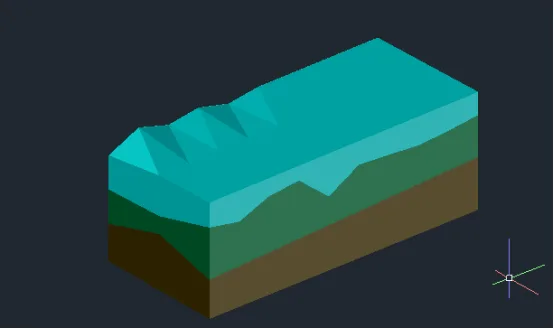
Figure 1: Civil3D Layered Geological Model
For large-scale and complex geological formations, the latest surface modeling techniques available in Civil3D can be effectively utilized. This involves importing the top elevations and coordinates of each geological layer in stages to create multiple surfaces. Using Civil3D’s built-in tools, these surfaces are then converted into solids representing each rock and soil layer. The resulting model elements can undergo Boolean operations to simulate processes such as shield tunneling. This method supports batch importing of drilling data and allows for rapid modeling. However, a limitation is that 3D entities can only be imported into other BIM software in DWG format, which may cause the loss of attribute data. Moreover, due to software settings, geological models created in Civil3D often appear surrounded by wireframes when imported into BIM platforms like Revit. This requires additional steps such as breaking apart and exploding the model before it can be fully utilized. The layered geological model created with Civil3D is illustrated in Figure 1.
Another approach involves using Revit to simulate geological strata by constructing floor slabs. This method defines the elevation interfaces between soil and rock layers by modifying sub-elements to incorporate drilling data. The 3D geological model produced is a solid model that can be edited, statistically analyzed, and sliced. However, when cutting entities in Revit, auxiliary elements must be retained, which can lead to clutter if many auxiliary elements are involved. Hiding these elements across different views can also be a cumbersome process. For simpler geological models, custom geological families can be created in Revit using standard modules, and custom properties such as Young’s modulus and Poisson’s ratio can be added to enrich the model’s parameters.
















Must log in before commenting!
Sign Up