
RevitAPI (Application Programming Interface) consists of a series of libraries and namespaces provided by Revit software, serving as a programming interface. This API enables developers to create customized functions tailored to users’ needs, facilitating easier and more efficient program development on the Revit platform.
Autodesk regards RevitAPI as a crucial component for Revit’s secondary development.
Over time, RevitAPI has evolved significantly. Initially limited to accessing document objects, it now includes user interaction APIs, object filtering APIs, and many other features, greatly enhancing its capabilities. Using RevitAPI, users can develop plugins to automate repetitive tasks, perform error checking, and generate detailed reports.
The object structure in Revit’s secondary development mainly divides into three categories: the Application class, the Document class, and the Element class. At the top of the class hierarchy are the Application and Document objects. The Application object represents the currently running Revit program, allowing users to manage all open documents and adjust various settings within Revit. The Document object corresponds to an open Revit file (such as .rvt or .rfa), enabling manipulation of the elements within that file.
An important component within the active Document is the View object. The visual interface and project drawings in Revit are composed of various View instances. By controlling the View objects, users can influence the visualization and drawing outcomes of their projects. The relationships between these main RevitAPI classes are illustrated in Figure 1, while Figure 2 shows their inheritance hierarchy.
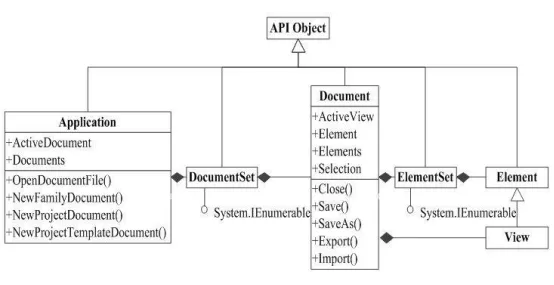
Figure 1: Revit Main Class Relationship Diagram
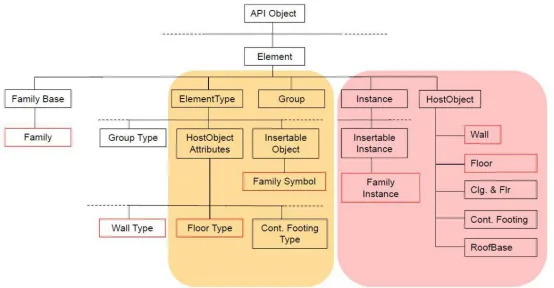
Figure 2: Revit Class Inheritance Diagram
















Must log in before commenting!
Sign Up