
A real estate development company plans to develop and construct Project B, covering a total construction area of 58,000 square meters. This includes 12,000 square meters of underground space, such as an underground parking garage and civil air defense facilities, and 46,000 square meters above ground. The project consists of 25 floors with a building height of 73.95 meters. The main buildings will comprise commercial, office, and hotel spaces. Construction began on November 17, 2010, with pre-completion acceptance on May 30, 2012, and final completion on September 22, 2012.
At the start of the project, a vast amount of engineering data is generated, involving multiple parties. Collaboration efficiency is low, and frequent design changes make cost management challenging. To overcome these issues, Building Information Modeling (BIM) technology is employed to enhance productivity and strengthen cost control.
Decision Stage
The decision stage focuses on analyzing project feasibility, conducting technical and economic evaluations, comparing different building schemes, and selecting the most economically viable construction plan. BIM significantly improves investment analysis efficiency during this phase.
At this stage, a BIM data model is created. The components within the BIM model are computable, allowing for rapid workload calculations. By integrating the enterprise BIM database, estimation indicators can be quickly retrieved to accurately prepare project investment estimates.
This project was modeled using Autodesk Revit. Figure 1 shows the project’s standard floor BIM model. Using the BIM model, the software’s summary calculation function quickly computes the building area, as illustrated in Figure 2.
After determining the total construction area, project investment estimates are prepared by consulting the project proposal or feasibility report requirements and current market prices. BIM technology enables swift and precise investment estimation, providing a solid foundation for project decision-making.
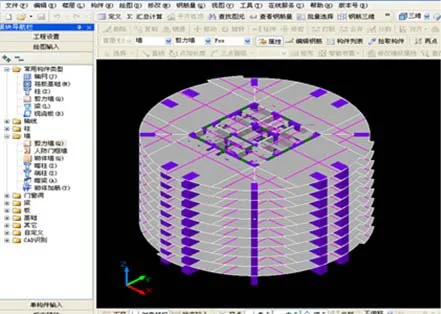
Figure 1: Standard Floor BIM Model
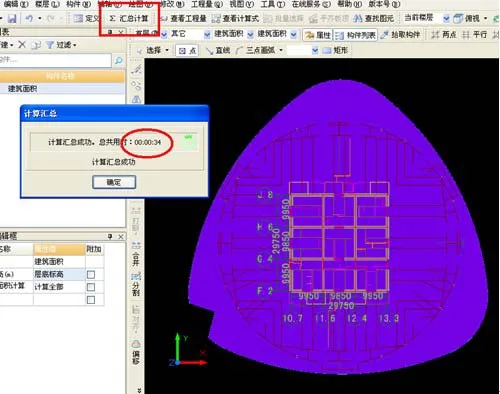
Figure 2: Building Area Statistics
Design Phase
During the design phase, BIM technology optimizes design schemes, conducts professional consistency checks on design models, and manages the preparation and review of design estimates and construction drawing budgets.
Once the project development is confirmed, the real estate company adopts a quota design method to control costs effectively. BIM models are utilized alongside accumulated engineering cost indicators from the enterprise BIM database to set quota targets before design begins.
Throughout the design process, BIM supports collaborative design across disciplines. The models also allow input of detailed information such as materials and component specifications, as shown in Figure 3. BIM facilitates quick retrieval of component quantities and pricing, enabling precise design estimates through its computational capabilities.
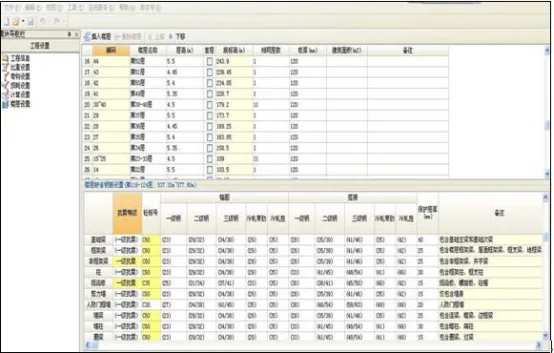
Figure 3: Component Attribute Settings
Additionally, BIM 3D models enable collision detection and design revisions during this phase, as demonstrated in Figure 4.
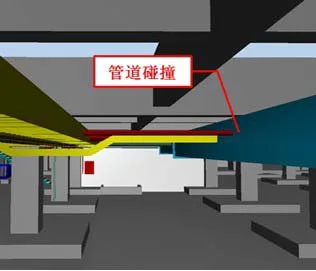
Figure 4: Pipeline Collision Inspection
Bidding Phase
In the bidding phase, the owner prepares the maximum bidding price, while bidders prepare their quotations. For example, the real estate company calculates or commissions a cost consulting firm to quantify the project. Once bidding documents are issued, each bidder reviews the bill of quantities and determines sub-item unit prices factoring in profit and risk to finalize their bids.
Given the large and complex quantities involved, BIM technology facilitates accurate quantity extraction and prevents omissions. Additionally, Company A can use BIM models as part of the bidding documents, greatly simplifying cost calculations at this stage.
Furthermore, BIM’s integration with internet technologies enhances bidding management by improving process control and transparency.
Construction Phase
The key cost control tasks during construction include payment management, change cost control, and claims management.
1) Engineering Payment Control
As the project progresses, subcontracted works increase. Using BIM software, based on the engineering supervisor’s approved progress images, the quantities of completed work can be extracted to efficiently verify the construction unit’s progress and corresponding payment value. BIM’s 3D visualization and automation help prevent misreporting or falsification. Figure 5 illustrates phased quantity exports using BIM.
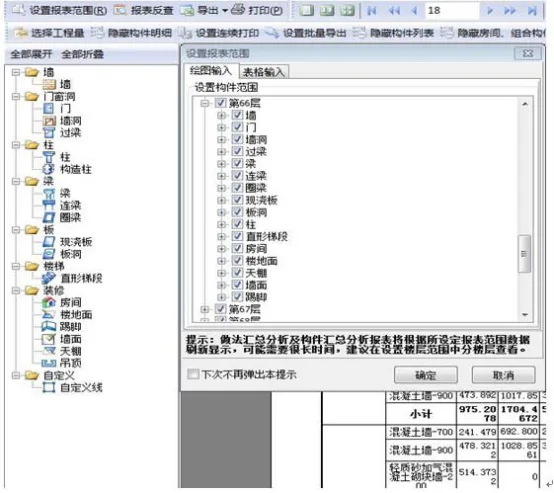
Figure 5: Periodic Export of Engineering Quantities
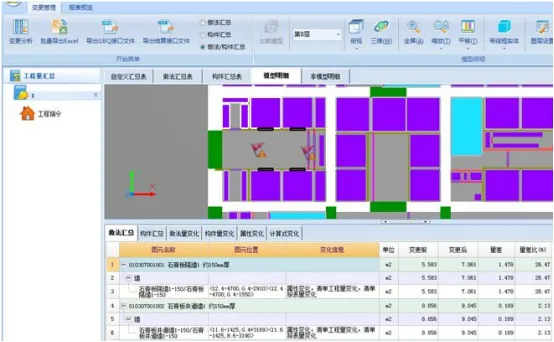
Figure 6: BIM Software Change Quantity Calculation
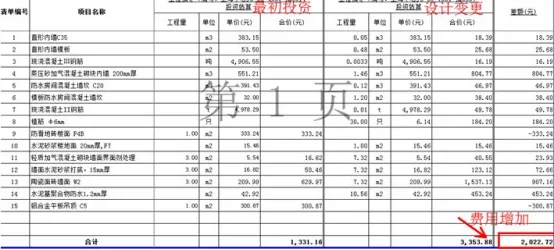
Figure 7: Dynamic Investment Report
2) Engineering Change Cost Control
Traditional cost accounting requires manual comparison of design changes across drawing versions, which is time-consuming and prone to errors. BIM software allows direct model modifications, visually displays changes using “BIM change software,” and automatically calculates and summarizes differences in quantities before and after changes, as shown in Figure 6.
The software generates before-and-after change files, enabling precise investment estimates for each design change. This helps Company A track dynamic increases or decreases in project investment and contract amounts, as reflected in the dynamic investment report (Figure 7).
3) Claims Management
On-site visa management is crucial during construction. BIM technology assists in comparing on-site conditions with planned designs using 3D simulations to accurately assess deviations. Workload related to visas is confirmed and corresponding costs are calculated based on summarized workloads.
Completion and Settlement Stage
After a lengthy construction process, the project generates a significant volume of engineering cost data, making settlement complex when relying on 2D CAD drawings. With BIM, the database evolves throughout the project, fully representing the engineering entity by completion. At handover, the BIM model expedites project settlement.
Establishing an Enterprise-Level BIM Database
Upon project completion, software tools extract cost indicators such as unit steel content. These indicators are compiled and entered into the enterprise BIM database. The project is archived in the case engineering library, and components are added to the enterprise component library for ongoing management. This database serves as a valuable reference for Company A’s future development projects.
















Must log in before commenting!
Sign Up