
When implementing building electrical design using BIM technology, the following management process is generally followed, as illustrated in Figure 1.
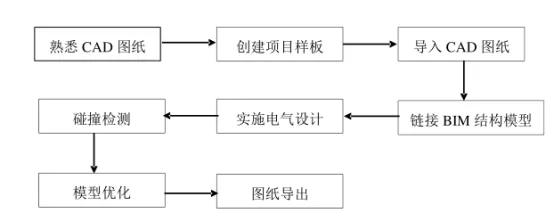
Figure 1: BIM Electrical Design Process
First, since BIM technology is not yet widely adopted across many design institutes and enterprises in China, most designers still rely on CAD technology for drafting. Therefore, designers must have a solid understanding of CAD drawings and related design principles. BIM designers begin by reviewing the CAD drawings to familiarize themselves with the project’s basic information, which helps them formulate an overall electrical design plan and approach.
Second, relying solely on the default system templates provided by BIM software is insufficient to meet the required design standards. These templates often fail to ensure consistency with CAD drawings or a comprehensive understanding of the entire electrical design project. Because electrical design involves numerous specialized stages, designers need to establish and refine project templates within the BIM software early on. This preparation enhances both the efficiency and quality of subsequent design work.
Third, CAD drawings are imported into the BIM software using a line positioning method. This integration allows the CAD drawings to assist the BIM design process by serving as a reference model.
Fourth, the BIM building structure model must be linked. The electrical design depends heavily on this structural model to accurately represent the spatial relationships between electrical pipelines and their connection with the building components.
Fifth, the design process requires a large collection of families—predefined components within BIM software—to support different aspects such as air conditioning layouts and cable tray designs.
Sixth, collision detection is performed using Revit MEP or other software equipped with built-in clash detection tools. This step checks for any conflicts between electrical pipelines, fittings, and structural elements. If no clashes are found, a collision detection report is generated.
Seventh, based on the results of the collision detection, the electrical model is optimized. This involves refining the design in accordance with relevant standards, regulations, and technical requirements to resolve any conflicts between pipelines and structures.
Finally, after completing the necessary optimizations, BIM construction drawings, 2D floor plans, and localized 3D views can be exported for further use.
















Must log in before commenting!
Sign Up