
This article is brought to you by the official BIM community.
Synchro is a 4D construction simulation software originally developed by the British company Synchro Ltd. In June 2018, it was acquired by Bentley Systems.
Today, Bentley’s Synchro 4D is not just a software but a comprehensive product ecosystem, with Synchro Pro as its core offering. The system also includes cloud-based products like Synchro Workgroup Project and Synchro Link; desktop tools such as Synchro Open Viewer and Synchro Scheduler; a mobile app called Synchro Site; and the mixed reality application Synchro XR.
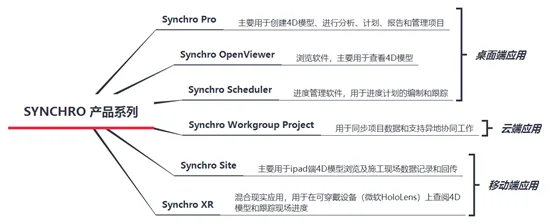
Synchro Pro serves as the centerpiece of Synchro’s construction solutions. It is primarily used to create 4D models for analysis, planning, reporting, and project management. The software boasts advanced construction schedule management features, including 4D planning, rehearsals, schedule control, resource tracking, and 5D quantity management.
Synchro OpenViewer is a free desktop application designed mainly for viewing 4D models. Another desktop tool, Synchro Scheduler, focuses on progress management and schedule tracking. It supports integration with projects such as Primavera P6 and can also be used free of charge.
The cloud-based Synchro Workgroup Project facilitates project data synchronization and remote collaboration. Synchro Site, the mobile app, enables users to view 4D models on iPads and capture or transmit construction site data. Lastly, Synchro XR is a mixed reality app that allows users to view 4D models and monitor on-site progress using wearable devices like Microsoft HoloLens.
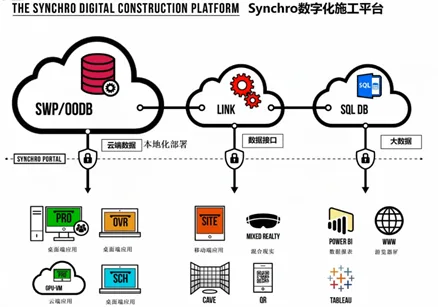
The following sections focus on the 4D progress management features of Synchro Pro, the core product.
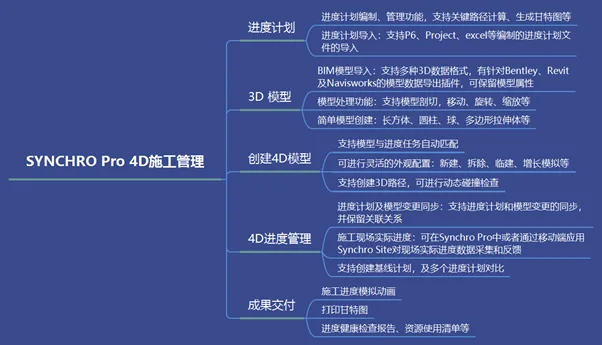
Schedule Planning and Import
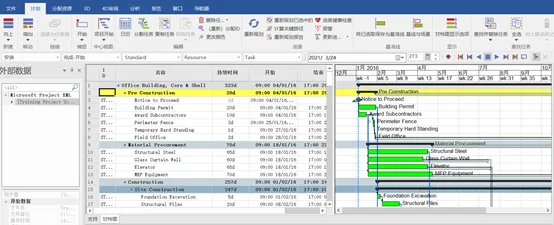
Synchro Pro offers comprehensive scheduling capabilities, supporting Critical Path Method (CPM) management. This functionality is also available in a standalone, free software called Synchro Scheduler.
Moreover, Synchro Pro allows importing external schedule plans and integrates with popular scheduling tools such as Microsoft Project XML, Primavera P6, and Excel.
When importing tasks from P6 or Project, Synchro Pro preserves task dependencies and attached resource information, ensuring data integrity.
Model Import and Editing
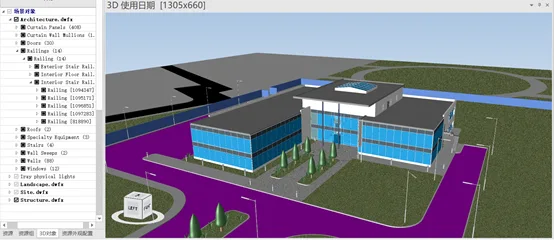
Synchro Pro supports over 50 different 3D data formats and includes model editing tools such as move, rotate, and scale. It can also create simple geometric shapes like rectangular prisms, cylinders, spheres, and polygon extrusions.
Additionally, Synchro Pro features a 3D model segmentation tool, which allows users to flexibly cut and adjust components. This segmentation is essential for simulating 4D construction progress, as it helps align the model’s granularity with the schedule’s level of detail.
Creating a 4D Model
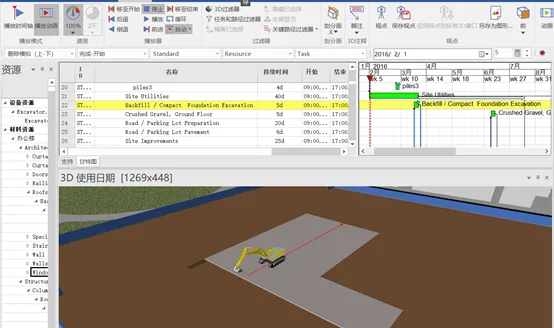
A 4D model combines a 3D model with scheduling information. In Synchro Pro, 3D models are linked to schedule tasks through resources. The software also supports automatic matching between models and tasks by defining matching rules based on model and task attributes.
Once the 4D model is created, users can conduct 4D rehearsals and reviews to verify the schedule’s logic and feasibility. Synchro Pro enables the creation of 3D paths, path animations, and dynamic collision detection to identify any scheduling conflicts or unreasonable task sequences early on, allowing timely adjustments.
4D Progress Management
1. Actual Progress Updates
Synchro Pro can integrate with the mobile app Synchro Site and the mixed reality application Synchro XR to record progress data from the construction site and transmit it back for synchronous updates. Users can also manually enter actual progress directly in Synchro Pro and adjust the schedule accordingly.
2. Schedule and Model Synchronization
During project execution, changes to schedules and 3D models are common. Synchro Pro offers synchronization features that update the latest model or schedule without disrupting the established links between models and tasks. This avoids redundant work and significantly improves change management efficiency.
3. Baseline Scheduling and Plan Comparison
Users can establish an initial baseline schedule that serves as the project’s progress target. By comparing actual progress against this baseline, it becomes easy to identify tasks that are ahead or behind schedule, thereby maintaining better control over project timelines.
















Must log in before commenting!
Sign Up