
Revit projects are composed of “families” and the data they contain, with both 2D and 3D families serving as essential components. If you think of a project file as a customizable house, then the various pieces of furniture inside represent different families. Using the Family Editor, you can assign data, shapes, and graphics to these furniture pieces, defining attributes like materials, colors, and textures. By assembling a variety of families, you can complete the project with rich content and features.
At the top of the hierarchy is the category, which classifies families. Template families fall into three main categories: flat templates, yin-yang corner templates, and supports. Flat templates can be further divided based on their properties into wall templates, beam templates, and floor templates. Wall templates themselves are subdivided depending on the presence of corner aluminum, resulting in two types: exterior wall templates and interior wall templates, each with distinct size specifications. Once the project is loaded, the lowest level—the family instance—can be created, as illustrated in Figure 1.
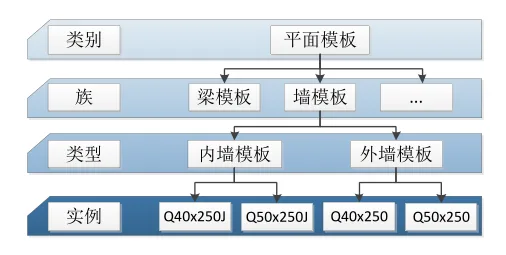
Figure 1: Hierarchical diagram of the family
The Revit family system includes three types: system families that users cannot edit within the software, built-in families created within the project environment, and loadable families developed in the Family Editor environment. System families, also known as host elements, consist of two types of built-in families: built-in models and built-in volumes. These are typically tied to parts of the project and are not intended for creation within the Family Editor. In contrast, loadable families, created in the Family Editor, are also called component families or component primitives—the term “family” commonly refers to these.
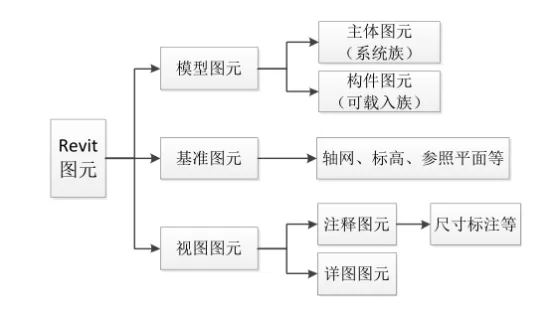
Figure 2: Types of Revit Elements
Both main and component elements mentioned above fall under model elements, which represent tangible objects in the project that exist physically in real life. As shown in Figure 2, Revit elements are categorized into model elements, reference elements, and view elements. Reference elements include commonly used tools such as grids, elevations, and reference planes, which assist in creating components and managing projects. Annotation and detail elements, like dimension annotations, belong to Revit’s view elements.
















Must log in before commenting!
Sign Up