
This article is authored by Yun Guixia Yin from the WeChat official account cgbridge.
The most straightforward use of rendering element channels is to break down the energy composition within an image.
Common rendering elements include VRayLighting, VRayGlobalIllumination, VRayReflection, VRayRefraction, and VRaySpecular.
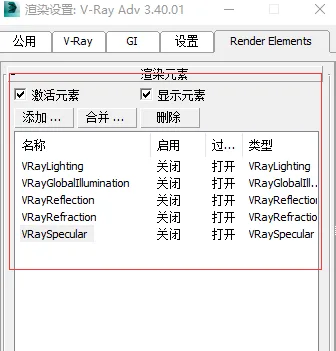
After adding these elements, make sure the active element is selected. This allows you to switch between the different rendering element channels via the drop-down menu once the rendering is complete.
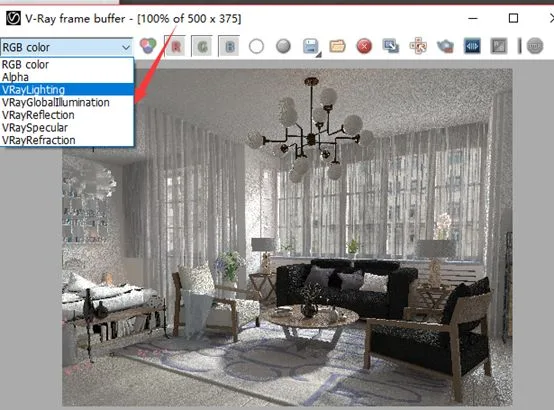
This approach clearly shows the energy contribution ratios of direct lighting versus indirect lighting in the scene.
If the indirect lighting is too strong, it can flatten the scene’s depth and cause the image to appear gray and washed out.
The concept behind rendering element channels is universal: an image is composed of multiple layers.
In other words, energy or effects are stacked layer by layer to create the final image. This layering concept is central to software workflows and technical analysis.
Next, we will save the images from the different rendering elements separately and import them into Photoshop. Using a color filter blend mode, we will overlay these images.
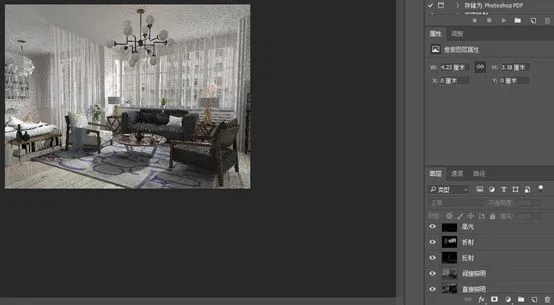
The combined result closely matches the directly rendered image. A careful comparison reveals it is slightly brighter, likely due to Photoshop’s color filter mode, but the overall layer hierarchy remains consistent.
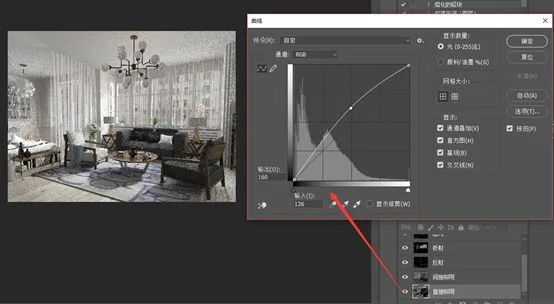
The benefit of this method is that individual layers can now be adjusted separately in Photoshop—for example, brightening the direct illumination layer.
















Must log in before commenting!
Sign Up