
In Revit, Family serves as the foundation of the software. When opening a Revit project, you’ll notice that all model elements are based on various FamilyInstances. These instances are categorized by their FamilySymbols, such as a circular column with a 400mm diameter or a circular column with a 500mm diameter. Together, these FamilySymbols compose the circular column family. For example, both rectangular and circular columns fall under the structural columns category in Revit. The relationship among these four concepts is illustrated in Figure 1.
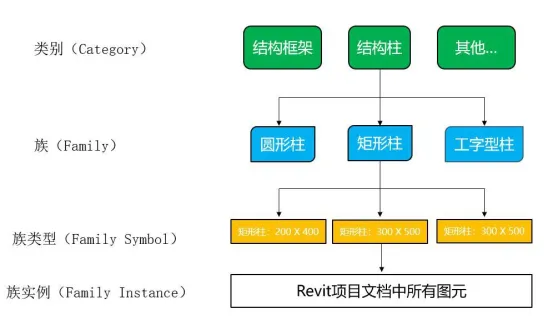
Figure 1: The relationship between categories, families, family types, and family instances
Revit divides families into three main categories: system families, loadable families, and built-in families. Below is an overview of each category:
(1) System Families
System families are predefined within Revit and include elements like walls, floors, ceilings, and ducts. Users can modify parameters or copy existing system families, but they cannot create new system families from scratch. Additionally, system families cannot be loaded as external files into projects or exported; however, their type information can be transferred between projects or templates through copy and paste.
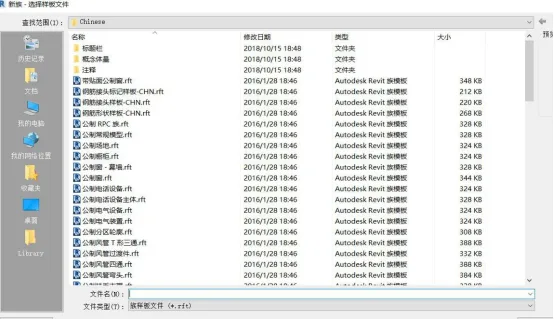
Figure 2: Family Template File
(2) Loadable Families
Revit offers numerous family template files, as shown in Figure 2. Using these templates, users can edit and add parameters like size, slope, and material to create new families. These newly created families can then be loaded into projects as loadable families or nested within other families. Loadable families are transferable between Revit projects and can also be exported to expand your family library for easy reuse.
(3) Built-in Families
Built-in families exist only within the current project and are typically used for specialized objects such as custom walls or ceilings. Unlike the other types, built-in families cannot be saved as separate family files or loaded into other projects. Due to their larger memory footprint, built-in families are used less frequently.
Article by Qian Bojian, East China Jiaotong University
For learning and communication purposes only. Copyright belongs to the original author.
















Must log in before commenting!
Sign Up