
Revit is a suite of software developed by Autodesk, primarily intended to help architects design, construct, and maintain buildings with enhanced quality and greater energy efficiency. It is widely regarded as one of the most popular BIM (Building Information Modeling) tools used globally in the construction industry. Key features of Revit include:
Revit Family Library
Revit comes with a built-in family library, organizing components by discipline, category, and type. All families in this library are loadable, meaning you can select an appropriate family template and use the Revit Family Editor to customize and add new families to the library for use across multiple projects. Today, the family library serves as a vital BIM resource for many companies, and developing custom family libraries has become an important business focus.
The parameterization of Revit families extends their versatility. By adjusting parameters, a single family can generate multiple variations, resulting in diverse appearances and properties.
Design Features
Revit provides numerous built-in materials to define physical properties during model creation. The visual appearance of these materials depends on the model’s graphic style, which includes six modes: wireframe, hidden line, shading, shaded with edges, consistent color, and realistic. Revit’s rendering capabilities allow models to achieve photo-realistic quality, making it easier to present design concepts to clients or team members.
The design options feature enables the storage of multiple design schemes within a single project file. For example, you can manage alternative layouts for room doors and windows or different roof structure designs all in one place.
Many projects are executed in phases, such as renovation projects where each phase represents a different stage in the project lifecycle: existing, new, temporary, or demolition. Revit allows you to assign building components to specific phases, and schedules automatically reflect these project stages.
Analytical Capabilities
Revit offers robust analysis tools:
- Area analysis helps calculate total building areas and specific room sizes, assisting in building and space planning.
- Conceptual massing models can be exported to green building analysis software to evaluate energy consumption, optimize designs, and promote energy-efficient building solutions.
- Equipment models can be analyzed for heating and cooling loads, helping determine the building’s energy requirements.
- Structural models can be imported into structural analysis software to assess structural performance.
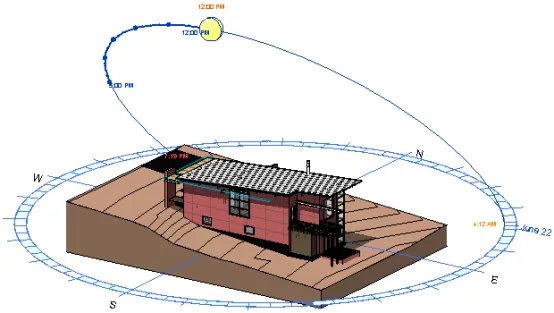
- The “Sunlight Path” feature, accessible from the status bar, allows users to study how sunlight affects building interiors and exteriors over different times of the year or day.
Article by Fang Chao, Xi’an University of Architecture and Technology.
For learning and communication purposes only. Copyright belongs to the original author.
















Must log in before commenting!
Sign Up