
The external reference method operates similarly to CAD 2D collaboration, but instead of referencing 2D objects, it uses Revit 3D models. This approach is ideal for large-scale building complexes where each subcomponent is individually sizable, serves different functions, and has clearly defined boundaries.
Unlike a centralized file where all data resides within a single model, the main advantage of external referencing lies in dividing the model into multiple smaller files. This segmentation significantly reduces hardware demands, which is crucial when resources are limited and helps maintain smooth project progress. However, splitting the files introduces challenges in standardizing reference file management. Although a common template can be loaded at the project’s start, manual oversight is required throughout the design process to avoid missing references. In contrast, centralized files provide instant data sharing, offering greater convenience compared to external references.
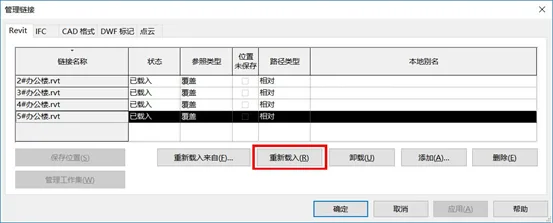
Figure 1: Revit External Reference Reload Command Interface
In this workflow, data flows only in one direction (via the Revit command: Reload). While subfiles can be viewed within the parent file, they cannot be modified directly. To make changes, these subfiles must be unloaded, unlinked, and opened separately. Without referencing the surrounding models, determining spatial positioning becomes difficult, and the modification process is cumbersome and inconvenient.
External referencing can also be applied across disciplines, where all models within a single discipline serve as external references. This practice is common during pipeline clash detection in the post-construction drawing phase. Since CAD drawings are relatively stable and rarely undergo major changes, each discipline can build its model based on the same elevation and grid references.
Yu Kan is for learning and exchange purposes only. Copyright belongs to the original author.
















Must log in before commenting!
Sign Up