
Revit, originally named “Revise Immediate” and interpreted in Chinese as “what you see is what you get,” was developed by Revit Technology in 1997 and acquired by Autodesk in 2002. Since then, it has become the most widely used 3D BIM (Building Information Modeling) software globally, primarily applied in civil construction projects. Its usage spans various specialties, including building engineering, structural engineering, and mechanical and electrical equipment engineering.
Revit organizes its data into several key file types: project files with the “.rvt” extension, template files ending in “.rte,” family files saved as “.rfa,” and family template files with the “.rft” suffix, as illustrated below.
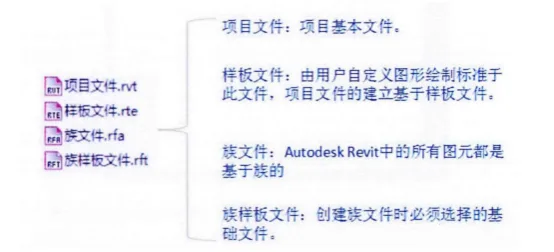
The project file contains all the data related to a construction project, including the 3D model, floor plans, elevations, sections, node diagrams, component schedules, and other relevant information. Using a single project file, users can modify the design and see those changes reflected across all associated views, such as plans, elevations, and sections, which streamlines project management.
A template file serves as the starting point automatically created by Revit when initiating a new project. It functions similarly to AutoCAD’s “.dwt” files, defining initial settings such as measurement units, floor configurations, and floor heights for the new project. Moreover, users can customize template files by defining their own settings and save them as new templates for future projects.
Family files are created using family template files and represent the basic building components within a project, including columns, beams, slabs, walls, doors, and windows. These families are fundamental to Revit, containing parameters that specify element dimensions, positions, and other attributes. These parameters enable efficient adjustment and accurate modeling of elements within the project.
















Must log in before commenting!
Sign Up