
I spent a lot of time experimenting online, searching for how to use code blocks. Most of what I found were just help documents from the official website.
After several hours of exploration, I finally understood how this code block works.
First, let’s skip the basics for now and focus here. This content is essentially a translation from the official website, but it lacks an explanation on how to define the types of input parameters. For those familiar with C# but new to Python, this can be confusing. Actually, converting from C# to Python, especially in terms of defining parameter types, only takes about a minute to grasp.
In C#, you define parameter types like this:
int a1;
In Python, the equivalent way is:
a1: int;
So, when developing for Revit with either C# or Python, the differences are minimal. However, I personally prefer the strong typing style of C#.
To supplement the above explanation, here is a simple example.
Find the midpoint between two points.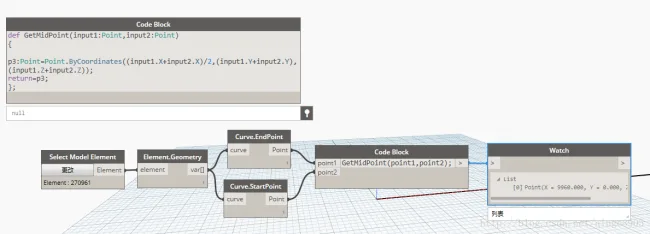
Here is another example involving a list array, which can be applied practically for building steel bars.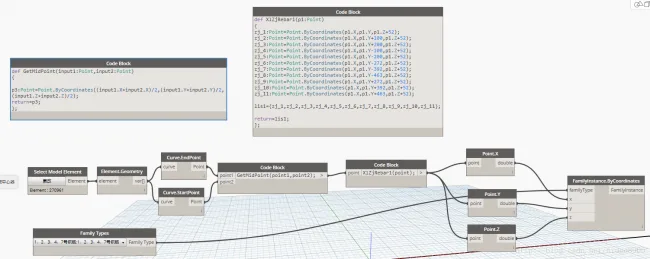
As shown below: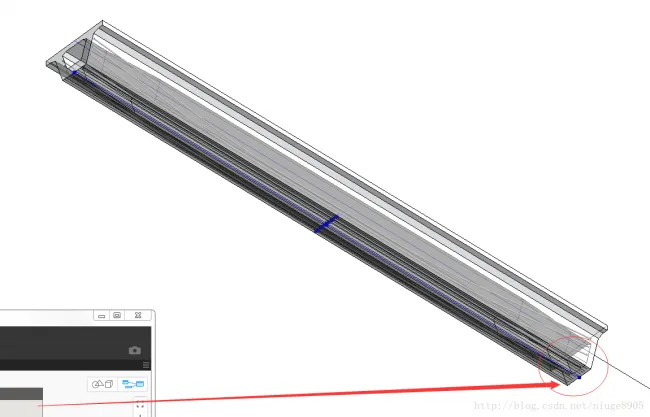
If you encounter more questions in the future, feel free to add them as well.















Must log in before commenting!
Sign Up