
The author recently explored exporting files in different formats using the Revit API and started by testing the export of CAD files in the .dwg format. The following methods were discovered through API research:
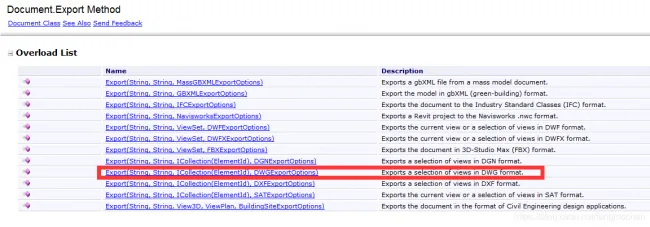
The image above shows that the Document class provides specialized methods readily available for use. During testing, the author found that the API also offers comprehensive methods, as demonstrated below:
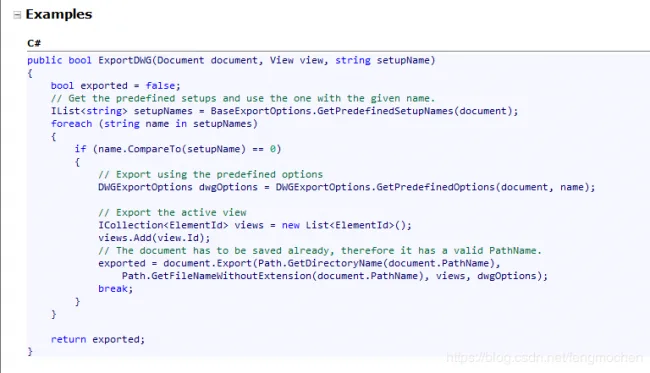
This method requires only three parameters to export CAD files successfully. The first two parameters are straightforward, while the third parameter specifies the export setting name, as shown below:
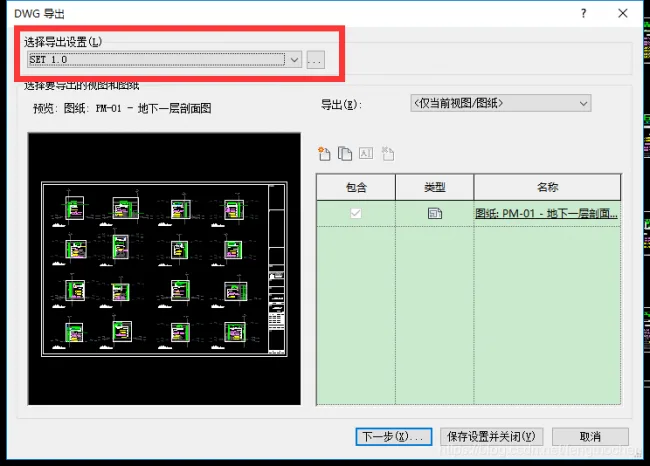
From the image, you can see that the third parameter used here is “SET 1.0”. Of course, users can create a new export setting or select a different one as needed.
Since the API provides this functionality directly, it can be used as shown in the example code below:
public Result Execute(ExternalCommandData commandData, ref string message, ElementSet elements)
{
    UIApplication uiApp = commandData.Application;
    UIDocument uiDocument = uiApp.ActiveUIDocument;
    Document doc = uiDocument.Document;
    Document linkDoc = FileOperation.GetLinkFile(uiApp, doc);

    // Custom export setting name
    string setName = "SET 1.0";
    bool isSuccess = false;
    isSuccess = ExportDWG(doc, doc.ActiveView, setName);

    if (isSuccess)
    {
        return Result.Succeeded;
    }
    else
    {
        return Result.Failed;
    }
}
The above demonstrates how to export CAD files using the Revit API. There are many additional operations possible, such as adding export settings or customizing layer configurations, which readers are encouraged to explore further. That concludes this article.















Must log in before commenting!
Sign Up