
In my previous post, I discussed linear numbering of parking spaces. I also introduced a method to number parking spaces within specific areas based on their respective zones. While organizing my files recently, I rediscovered this method, made some improvements, and decided to document it here.
The workflow of this Dynamo script begins by identifying the relevant parking spaces and areas based on a selected elevation and area keywords. It then extracts the boundaries of these areas, checks which parking spaces fall within each boundary, and finally counts and numbers the parking spaces accordingly.
Example:
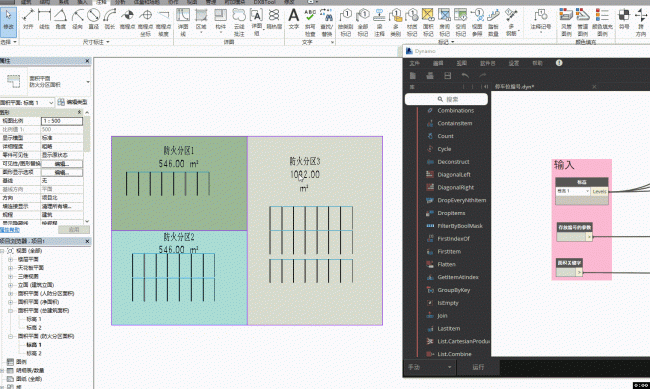
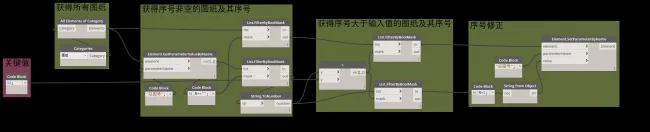
Node Overview:
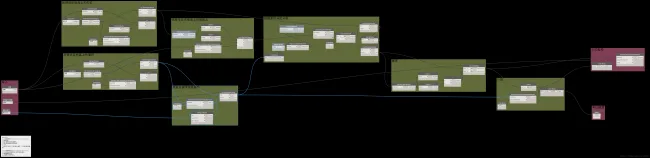
Key Points:
- Filtering Areas and Parking Spaces:
You can assign parking space numbers project-wide, but to maintain better control, this script filters elements based on elevation. Before running, select an elevation. The script then checks the elevation parameters of all areas and parking spaces, filtering only those that match the selected elevation. A nuance here is that when retrieving the elevation of a parking space using theElement.GetParametersValueByNamenode, it returns an Element object, whereas for areas, it returns the elevation name directly. Therefore, an additionalElement.Namenode is used to extract the elevation name from parking spaces. After gathering elevation names for all elements, Boolean filters isolate the matching graphic elements. - Determining Parking Space Locations:
Even after filtering by elevation, some parking spaces may have height offsets. To address this, new points are created using the X and Y coordinates of each parking space combined with the elevation height. This ensures accurate spatial intersection checks with area boundaries. - Obtaining Area Boundaries:
Extracting area boundaries is challenging because there are no built-in nodes that directly provide this data. Initially, the idea was to collect all boundary lines, perform spatial checks, and define each area’s boundary from these. However, this approach proved cumbersome. Instead, a Python node was developed to extract the boundaries efficiently. After obtaining the boundaries, surfaces are generated, and intersections between parking space locations and these surfaces determine which parking spaces belong to which areas. - Numbering:
The numbering logic should be customized to fit actual project requirements. In this example, the parking spaces are numbered using theSortByKeynode, sorting based on their X and Y coordinates. This results in numbering from the bottom-left to the top-right. It is important to exclude areas without parking spaces before numbering to avoid errors.
Python Node Core Code:
# Unwrap input elements
areas = UnwrapElement(IN[0])
_list = []

# Iterate through each area to get its boundary
for a in areas:
    lineList = list()
    options = SpatialElementBoundaryOptions()
    for boundaryList in a.GetBoundarySegments(options):
        for boundary in boundaryList:
            lineList.append(boundary.GetCurve().ToProtoType())
    _list.append(lineList)
OUT = _list
xuebim
Follow the latest BIM developments in the architecture industry, explore innovative building technologies, and discover cutting-edge industry insights.
← Scan with WeChat












Must log in before commenting!
Sign Up