
I’ve been busy with various projects recently, and after taking a break during the Chinese New Year, I felt a bit unfamiliar and confused when revisiting the code. It seems I still need some time to readjust and get back into the groove.
Due to differences in software and collaboration methods, Revit tends to be more error-prone when deleting elements compared to CAD. During this project phase, there were two instances where electrical endpoints were accidentally deleted or modified. To address this, we aim to use secondary development to verify these points and reduce project review costs.
The concept is straightforward. Once an initial point is established, its ID and location information are read and stored in a file. Later, during review, the location ID and details are re-read and matched against the stored data to identify which locations have been adjusted, then notify the user accordingly.
Here are the key code snippets:
Storing key information:
public Result Execute(ExternalCommandData commandData, ref string message, ElementSet elements)
{
    Document doc = commandData.Application.ActiveUIDocument.Document;
    List<string> keyDatas = new List<string>();

    foreach(Element elem in CheckETool.GetEElement(doc))
    {
        // Family and type information
        Parameter parameter = elem.get_Parameter(BuiltInParameter.ELEM_FAMILY_AND_TYPE_PARAM);
        // Location information
        LocationPoint locationPoint = elem.Location as LocationPoint;
        if (locationPoint != null)
        {
            // Export key information
            CheckETool cet = new CheckETool();
            cet.InputXML(@"C:UsersimfourDesktop测试文件夹KeyData.xml", elem.Id.IntegerValue, parameter.AsValueString(), locationPoint.Point.ToString(), locationPoint.Rotation.ToString());
        }
        else
        {
            // Linear path handling
            // to do
        }
    }
    return Result.Succeeded;
}
Checking information:
public Result Execute(ExternalCommandData commandData, ref string message, ElementSet elements)
{
    Document doc = commandData.Application.ActiveUIDocument.Document;

    List<string> newElems = new List<string>();
    List<string> modElems = new List<string>();
    List<string> delElems = new List<string>();

    CheckETool cet = new CheckETool();

    // Identify new and modified elements
    foreach (Element elem in CheckETool.GetEElement(doc))
    {
        int status = cet.CheckElement(@"C:UsersimfourDesktop测试文件夹KeyData.xml", elem);
        if (status == 0)
        {
            string info = elem.get_Parameter(BuiltInParameter.ELEM_FAMILY_AND_TYPE_PARAM).AsValueString() + ", id " + elem.Id.ToString();
            newElems.Add(info);
        }
        if (status == 1)
        {
            string info = elem.get_Parameter(BuiltInParameter.ELEM_FAMILY_AND_TYPE_PARAM).AsValueString() + ", id " + elem.Id.ToString();
            modElems.Add(info);
        }
    }

    // Identify deleted elements
    cet.GetDeletedElement(@"C:UsersimfourDesktop测试文件夹KeyData.xml", doc, ref delElems);

    if (newElems.Count == 0 && modElems.Count == 0 && delElems.Count == 0)
    {
        TaskDialog.Show("Task", "Check completed, no issues found with the endpoints.");
    }
    else
    {
        StreamWriter streamWriter = new StreamWriter(@"C:UsersimfourDesktop测试文件夹result.txt", false, Encoding.Default);

        if (newElems.Count > 0)
        {
            streamWriter.WriteLine("==================================================");
            streamWriter.WriteLine("Detected " + newElems.Count + " new endpoints:");
            foreach(string str in newElems)
            {
                streamWriter.WriteLine(str);
            }
        }

        if (modElems.Count > 0)
        {
            streamWriter.WriteLine("==================================================");
            streamWriter.WriteLine("Detected " + modElems.Count + " modified endpoints:");
            foreach (string str in modElems)
            {
                streamWriter.WriteLine(str);
            }
        }

        if (delElems.Count > 0)
        {
            streamWriter.WriteLine("==================================================");
            streamWriter.WriteLine("Detected " + delElems.Count + " deleted endpoints:");
            foreach (string str in delElems)
            {
                streamWriter.WriteLine(str);
            }
        }
        streamWriter.Close();
    }
    return Result.Succeeded;
}
Methods used:
class CheckETool
{
    public static IList<Element> GetEElement(Document document)
    {
        FilteredElementCollector fec = new FilteredElementCollector(document);
        // Filters
        List<ElementFilter> elementFilters = new List<ElementFilter>();
        BuiltInCategory[] builtInCategories = {
            BuiltInCategory.OST_ElectricalFixtures,    // Electrical fixtures
            BuiltInCategory.OST_ElectricalEquipment,   // Electrical equipment
            BuiltInCategory.OST_FireAlarmDevices,      // Fire alarm devices
            BuiltInCategory.OST_NurseCallDevices,      // Nurse call devices
            BuiltInCategory.OST_DataDevices,            // Data devices
            BuiltInCategory.OST_LightingDevices,       // Lighting devices
            BuiltInCategory.OST_LightingFixtures,      // Lighting fixtures
            BuiltInCategory.OST_TelephoneDevices,      // Telephone devices
            BuiltInCategory.OST_CommunicationDevices,  // Communication devices
            BuiltInCategory.OST_Sprinklers,             // Sprinklers
            BuiltInCategory.OST_PlumbingFixtures        // Plumbing fixtures
        };
        foreach (var BIC in builtInCategories)
        {
            ElementFilter ef = new ElementCategoryFilter(BIC);
            elementFilters.Add(ef);
        }
        LogicalOrFilter filter = new LogicalOrFilter(elementFilters);
        return fec.WherePasses(filter).WhereElementIsNotElementType().ToElements();
    }

    public void InputXML(string fileFullName, int id, string familyAndTypeName, string locationPoint, string locationRotation)
    {
        XmlDocument xmlDoc = new XmlDocument();
        // If file exists, find and remove the node
        if (File.Exists(fileFullName))
        {
            xmlDoc.Load(fileFullName);
            var tNote = xmlDoc.DocumentElement.SelectSingleNode("id" + id.ToString());
            if (tNote != null)
            {
                xmlDoc.DocumentElement.RemoveChild(tNote);
            }
        }
        else
        {
            XmlDeclaration xmlDec = xmlDoc.CreateXmlDeclaration("1.0", "UTF-8", null);
            // Root node
            XmlElement root = xmlDoc.CreateElement("ERoot");
            xmlDoc.AppendChild(xmlDec);
            xmlDoc.AppendChild(root);
        }

        XmlElement idNote = xmlDoc.CreateElement("id" + id.ToString());
        xmlDoc.DocumentElement.AppendChild(idNote);

        XmlElement familyAndTypeNameNote = xmlDoc.CreateElement("FamilyAndTypeName");
        familyAndTypeNameNote.InnerText = familyAndTypeName;
        idNote.AppendChild(familyAndTypeNameNote);

        XmlElement locationPointNote = xmlDoc.CreateElement("LocationPoint");
        locationPointNote.InnerText = locationPoint;
        idNote.AppendChild(locationPointNote);

        XmlElement locationRotationNote = xmlDoc.CreateElement("LocationRotation");
        locationRotationNote.InnerText = locationRotation;
        idNote.AppendChild(locationRotationNote);

        xmlDoc.Save(fileFullName);
    }

    ///
    /// Status codes:
    /// "-1": Not found
    /// "0": Element not recorded
    /// "1": Element location modified
    /// "2": Element location matches record
    ///
    public int CheckElement(string fileFullName, Element element)
    {
        XmlDocument xmlDoc = new XmlDocument();
        if (File.Exists(fileFullName))
        {
            xmlDoc.Load(fileFullName);
            string sID = "id" + element.Id.IntegerValue;
            var tNote = xmlDoc.DocumentElement.SelectSingleNode(sID);
            if (tNote != null)
            {
                LocationPoint locationPoint = element.Location as LocationPoint;
                // Compare location
                if (locationPoint.Point.ToString() == tNote.SelectSingleNode("LocationPoint").InnerText && locationPoint.Rotation.ToString() == tNote.SelectSingleNode("LocationRotation").InnerText)
                {
                    return 2;
                }
                else
                {
                    return 1;
                }
            }
            else
            {
                return 0;
            }
        }
        else
        {
            // TaskDialog.Show("Error", "Configuration file is missing.");
        }
        return -1;
    }

    public List<string> GetDeletedElement(string fileFullName, Document document, ref List<string> deletedElems)
    {
        XmlDocument xmlDoc = new XmlDocument();
        if (File.Exists(fileFullName))
        {
            xmlDoc.Load(fileFullName);
            foreach (XmlElement note in xmlDoc.DocumentElement.ChildNodes)
            {
                ElementId elementId = new ElementId(Convert.ToInt32(note.Name.Replace("id", "")));
                if(document.GetElement(elementId) == null)
                {
                    string info = note.SelectSingleNode("FamilyAndTypeName").InnerText + ", " + note.Name;
                    deletedElems.Add(info);
                }
            }
        }
        return deletedElems;
    }
}
Test results:
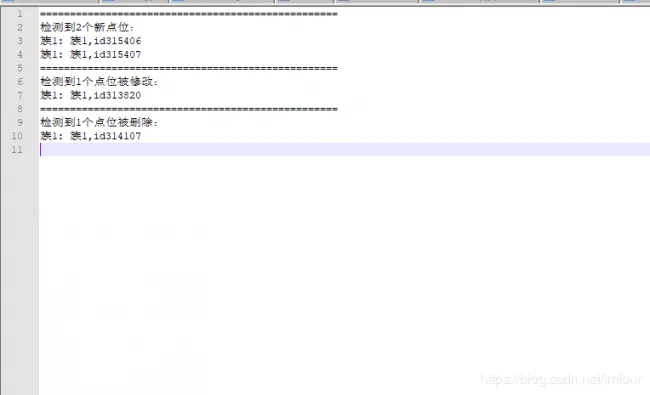
This was a simple initial attempt. However, during the development process, I realized there are many areas worth further exploration. For example, the results could be displayed in a window and linked directly to model elements, making it easier to view changes within the model. Additionally, the output could be more detailed by specifying exact modifications made. Fundamentally, detecting changes to these endpoints is a form of document comparison, which opens up many other potential applications.















Must log in before commenting!
Sign Up