
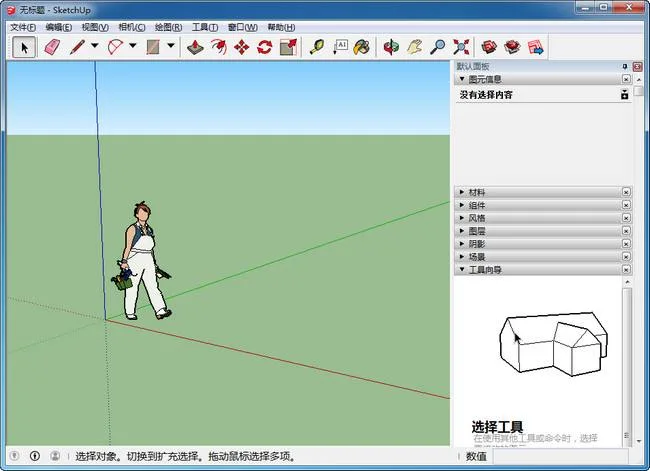
SketchUp 2016, also known as SketchMaster, has long been a preferred tool for rapid sketch creation in the design industry. It allows designers to express their ideas directly on the computer with ease, providing an intuitive solution for 3D architectural design.
The latest SketchUp Pro 2016 (SketchMaster) version brings enhanced performance along with a range of new features. These include extended arrow key locking, automatic snapping to circle and arc centers, shortcut keys to adjust circle and arc segment counts, and improved parallel and perpendicular inference references. Key tools such as coordinate axes, sectioning, protractors, move, offset, and rotate have also been upgraded.
Importantly, this version is fully compatible with both Apple’s El Capitan and Microsoft Windows 10, broadening its accessibility to users across platforms.
Product Features:
- A clean, unique interface designed for quick learning and efficient work.
- Highly versatile, suitable for architecture, urban planning, landscaping, interior design, and industrial design.
- The convenient Push/Pull tool enables easy creation of 3D geometry from simple 2D shapes, eliminating the need for complex modeling.
- Fast section generation at any point, allowing clear insight into a building’s internal structure. 2D section drawings can be freely created and quickly imported into AutoCAD for further refinement.
- Seamless integration with software such as AutoCAD, Revit, 3ds Max, and Piranesi. Supports rapid import/export of DWG, DXF, JPG, and 3DS file formats, facilitating smooth workflow from conceptual design to rendering and construction drawings. Plugins for AutoCAD and ARCHICAD are also available.
- A comprehensive library of components including doors, windows, columns, furniture, and material textures for building models.
- Easy creation of animated demonstration videos to vividly present design concepts.
- Multiple display modes such as wireframe, shaded, perspective, and rendered views for enhanced visualization.
- Accurate shadow and sunlight positioning for real-time analysis based on building location and time.
- Convenient annotation tools for spatial dimensions and text, with section annotations that always face the designer for clarity.
Installation Tutorial:
- SketchUp Pro 2016 is offered in both 32-bit and 64-bit versions. Select the one matching your system. Run the installer, choose the installation directory (default is recommended), and proceed with installation.
- Accept all default options during setup. Once installation is complete, click “Finish.”
- Copy the file
su2016-64 registration machine.exefrom the downloaded package into the installation folder:C:Program FilesSketchUpSketchUp 2016(default location). - Double-click
su2016-64 registration machine.exewithin the installation directory and follow the on-screen instructions. - Select
LayOut.exefromC:Program FilesSketchUpSketchUp 2016LayOutand click “Open.” - When prompted by the confirmation dialog, click “Yes.”
- Select
Style Builder.exefromC:Program FilesSketchUpSketchUp 2016Style Builderand click “Open.” - The registration tool will display a success message, confirming that the software is fully activated and ready to use.
New Features in SketchUp Pro 2016
- Integration with Trimble Connect, a collaborative work platform.
- Ability to reload models directly from the 3D Warehouse.
- Customizable report generation functionality.
- Enhanced parallel and perpendicular inference references, extended arrow key locking, automatic snapping to circle and arc centers, and shortcut keys to adjust segment counts for circles and arcs. Improvements to coordinate axes, sectioning, protractors, move, offset, and rotate tools.
- Customizable side panels for a personalized workspace.
- Updated default material library.
- Use of SVG vector graphics for icons, cursors, and UI elements for improved clarity.
- Strengthened extension plugin review process to ensure better stability.
- Refreshed welcome interface.
- Redesigned Help Center.
- Full compatibility with Windows 10 and macOS El Capitan.













Must log in before commenting!
Sign Up