
SketchMaster 2015 is a straightforward yet powerful tool that allows you to explore and express ideas within a 3D environment. Known for its popularity and user-friendly interface, SketchUp is often referred to as the “pencil” of digital design.
Product Features
- A unique, streamlined interface that designers can quickly learn and master.
- Highly versatile, suitable for architecture, urban planning, landscaping, interior design, and industrial design.
- The convenient push-pull function enables easy creation of 3D geometry from a single graphic, removing the need for complex 3D modeling techniques.
- Quickly generate sections at any point to gain a clear understanding of a building’s internal structure; 2D section diagrams can be freely created and imported into AutoCAD for further refinement.
- Seamless integration with software such as AutoCAD, Revit, 3DMAX, and PIRANESI, supporting import and export of DWG, DXF, JPG, and 3DS formats. Plugins for design tools like AutoCAD and ARCHICAD combine conceptual design, rendering, and construction drawings.
- Includes an extensive library of components: doors, windows, columns, furniture, and materials for realistic textures and edges.
- Enables easy creation of demonstration videos and animations to effectively showcase the designer’s creative ideas.
- Supports various display modes including draft, line draft, perspective, and rendering.
- Precisely locates shadows and sunlight, allowing real-time analysis based on the building’s location and time.
- Offers convenient annotation of spatial dimensions and text, with annotation sections that always face the designer.
SketchUp 2015 Installation Guide
Before You Begin:
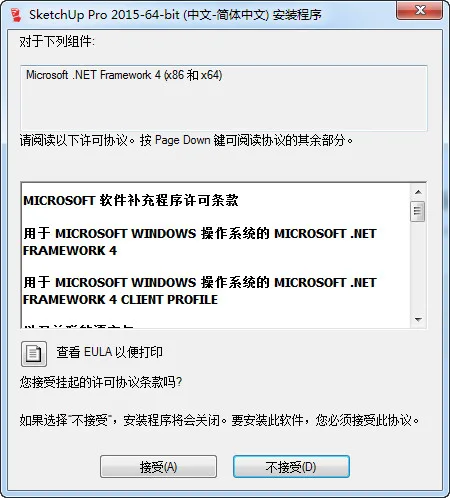
During installation, Microsoft .NET Framework 4 will be automatically detected. If it’s not already installed, the system will download and install it for you. Installation speed depends on your Internet connection, so please be patient if you have a slower network.
1. Run the installer, select your preferred installation directory, and complete the setup process.
Cracking Instructions:
32-bit Version:
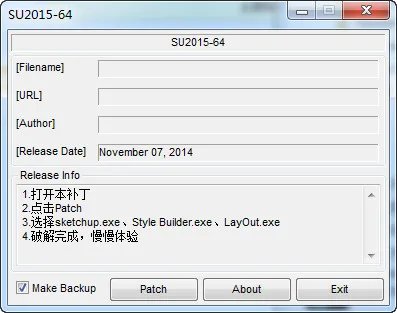
After installation, copy the cracked patch named “Sketchup2015-32-bit patch” from the compressed file into the SketchUp 2015 folder. Open the patch and run it. Select the three appropriate files to complete the patching process.
64-bit Version:
Similarly, after installation, copy the cracked patch named “Sketchup2015-64bit patch” from the compressed file into the SketchUp 2015 directory. Open and run the patch, then select the three correct files to finish the cracking process.
What’s New in SketchUp 2015
Quick Style
Styles are a powerful and engaging feature in SketchUp, yet many users underestimate how much they can speed up modeling. We have started labeling styles that help SketchUp run faster and smoother. “Quick Styles” specifically require less from your computer’s graphics hardware. For more information or to create your own quick styles, visit the SketchUp Knowledge Center.
Improved Face Finder
In SketchUp 2015, we optimized the face finder code—a critical feature responsible for automatically creating faces from coplanar edges. Since it runs frequently, improving its efficiency significantly enhances the overall user experience. Tests on large models showed noticeable improvements in operations like exploding groups and model interleaving.
New and Enhanced Tools
Rotating Rectangle
Previously available as a free but lesser-known extension, the rotating rectangle tool lets you draw rectangles at any angle—not just 90 degrees—on the ground plane. Due to its popularity, we integrated and enhanced it in SketchUp 2015. Now, you can create off-axis rectangles at any angle, even beyond the ground plane. Give it a try—you might feel like it’s your first time using SketchUp.
Three-Point Arc
SketchUp is no longer limited to drawing boxes. The new three-point arc tool offers four different ways to draw arcs. It allows you to define an arc’s height based on its endpoints, perfect for precise intersections along an arc path. Unlike the older two-point arc tool that uses the center point to set height, this new tool gives you full control to draw any arc shape.
Two-Section Label Leader in LayOut (Pro)
We’re passionate about labels! Tags are essential for construction and detailed drawings in LayOut, and adding them is now more intuitive and enjoyable. In the 2015 version, labels have been improved to easily create and align clean two-section or one-section label leaders, as well as curved leaders. Click once to start drawing a label leader, click again to set a turning point, or hold the mouse on the second click to bend the leader. Double-click to create a sectional label leader. The controls are simple and flexible.
Information Modeling
IFC Format Import and Classifier Enhancements (Pro)
This release reinforces our commitment to Building Information Modeling (BIM). We have added IFC import capabilities, enabling bidirectional exchange of information models between SketchUp and other BIM applications—a significant step towards data-driven workflows.
Classifier Improvements
The classifier tool now supports generating reports based on classifications. It can recognize IFC Building and IFC Building Story components and preserve them during exports.
LayOut Smart Tags (Pro)
Tagging in LayOut has become both more practical and enjoyable. When referencing a model in LayOut, the tagging tool lets you select metadata to automatically fill text fields. Smart tags provide easy access to component definitions, information modeling, classification, area calculations, and more. Just like model geometry, updating references in LayOut files automatically refreshes the metadata displayed in labels.













Must log in before commenting!
Sign Up