
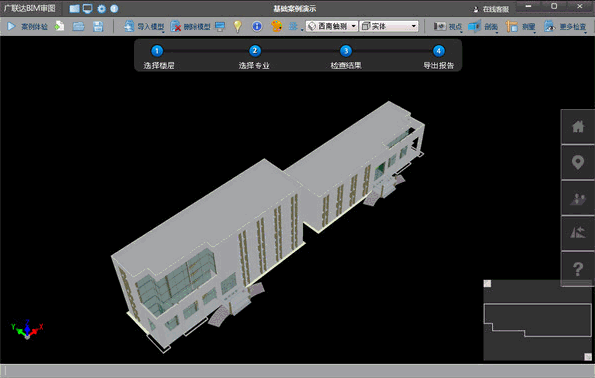
Guanglianda BIM Drawing Review Software utilizes 3D models to eliminate reliance on experience, intelligently reviewing drawings by replacing manual inspection with computer automation. Leveraging BIM technology, it quickly, comprehensively, and accurately predicts potential project issues. With one click, users can return to the modeling software to precisely locate problems and make swift corrections. This process enhances work efficiency, fosters communication, and strengthens project management capabilities.
The BIM drawing review supports model sharing with Guanglianda civil engineering, installation, Revit, and Magicad software, enabling one-time modeling with multiple applications.
Key Features of Guanglianda BIM Drawing Review Software:
- Comprehensive Model Integration: Covers civil engineering, mechanical, electrical, plumbing (MEP), and reinforcement steel, including full professional types like field layout.
- User-Friendly Interface: Minimalist operations and intuitive design allow users to master core functions within 5 minutes.
- Genuine Free Software: No registration or verification codes required. Core functions are permanently free.
- Wide Compatibility: Supports mainstream model files such as Revit, Tekla, MagiCAD, Guanglianda BIM calculations, and the international IFC standard.
Software Highlights:
- Collision Detail Viewing and Viewpoint Management: Switch between multiple display states for collision details, create viewpoints for annotations and corrections.
- Localized Collision Detection: Choose professional models (civil engineering, water supply and drainage, fire protection, heating, ventilation, electrical), systems, and components for collision detection. Detects both hard collisions and pipeline gaps, ceiling spaces, etc., tailored to meet the actual needs of Chinese users.
- Full Professional Integration and Multi-Software Support: Quickly import civil engineering models and calculations from Guanglianda Install, compatible with Revit, Magicad, Tekla, and more.
- Stair Inspection: Detects stair height and step count. Users can adjust detection standards according to project requirements.
- Room Height Verification: One-click display of net room height, enabling easy and intuitive viewing of the lowest pipeline position within each room.
- Inspection Results Analysis: Utilize professional and component filtering, set priority rules, and group functions to simplify and process inspection outcomes efficiently.
- Roaming and Walkthrough: Experience the building interior’s aesthetics, functional usability, and spatial rationality through roaming and route-following features.
- Export Professional Reports: Export collision and viewpoint reports in multiple formats, facilitating communication and modifications across different disciplines.
- One-Click Return for Model Modification: Quickly send inspection results back to the modeling software, accurately locate problematic elements, and verify modifications by returning to the review software with one click.
Update Log:
- Significantly optimized efficiency, further reducing memory usage.
- Added grouped export reports.
- Resolved some IFC import issues.
- Introduced a mini-map feature for clearer browsing location overview.
- Fixed known bugs.














Must log in before commenting!
Sign Up