
Content source: Yuanchuang BIM

Introduction
1. Background
3D visualization is an advanced application of BIM technology that builds upon existing models. Unlike traditional renderings or animations that focus on visual effects, BIM’s 3D representation emphasizes realistic spatial accuracy.
As BIM technology becomes widely adopted in engineering and construction, its applications continually evolve. The 3D visualization capabilities based on BIM models have significantly improved alongside BIM’s advancement.
Recent years have seen rapid upgrades in computer hardware and real-time rendering technology, leading to the emergence of numerous real-time rendering software options. These tools reduce rendering times and simplify operations, enabling quick visualization of true spatial environments with enhanced effects. Staying current with these technologies boosts work efficiency.
2. Research Purpose and Significance
This study summarizes the workflow for integrating BIM models with Mars software, identifies challenges encountered during the process, and proposes solutions to improve efficiency and support spatial and performance aspects during the design stage.
About Mars Software
Mars software is a real-time rendering platform developed by Glorious City Company based on gaming technology. It offers a rich resource library for scenes, materials, lighting, weather, and more. Users can adjust parameters and enrich scenes while observing effects in real time, achieving a WYSIWYG (What You See Is What You Get) experience that significantly reduces design production time.
Mars software does not support model shape editing. Models must be created in dedicated modeling software and then imported into Mars for effect editing. The software is primarily used to generate visual presentations, including VR and 3D videos, enhancing the immersive experience for clients after project completion.
Hardware Requirements
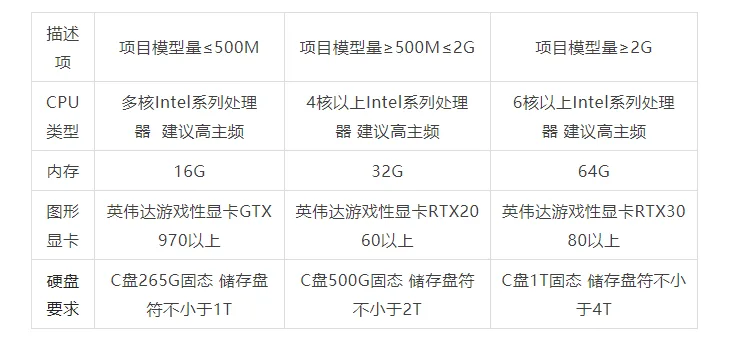
Real-time rendering relies heavily on CPU performance and requires a capable graphics card. The official minimum recommended GPU is a GTX1060. In practice, a GTX970 can smoothly handle projects under 500MB. Below is the recommended PC configuration. For VR demonstrations, a GTX1070 or better is recommended.
Deliverables Generated by Mars Software
Mars software can produce a variety of deliverables:
- Rendering: Real-time rendering generates images quickly, drastically reducing rendering time.
- Panoramic Images: High-definition panoramic images can be output and combined with Venus software to create panoramic stories, easily shared via QR codes.
- Panoramic Videos: Used for project presentations, these videos allow clients to experience designer-set routes through VR devices without manual control for a fully immersive experience.
- 3D Stereoscopic Projection: For multi-person presentations, scenes can be switched to a 3D stereoscopic movie effect with one click, paired with shutter glasses to enhance immersion.
- VR Immersive Experience: Multiple users from different locations can synchronously access the same scene online, with voice interaction to support remote presentations.
- PC Video Roaming: Allows direct playback of animations and scene switching within Mars software during presentations, enabling real-time interactive editing and plan modification for improved reporting.
Workflow and Methodology for Combining BIM Models with Mars Software
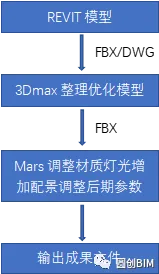
1. Tips for Building Revit Models
- Minimize model duplication and ensure proper cutting relationships.
- Differentiating materials is essential. Revit contains many default family materials, and if not distinguished, all default materials are assigned uniformly after import into Mars, losing component-specific material assignments. Proper material distinction during modeling is necessary.
2. Choosing Export File Formats from Revit
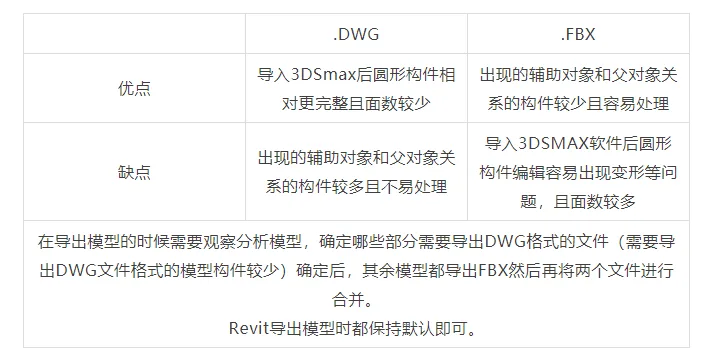
For interaction between Revit and 3ds Max, DWG and FBX formats are commonly used.
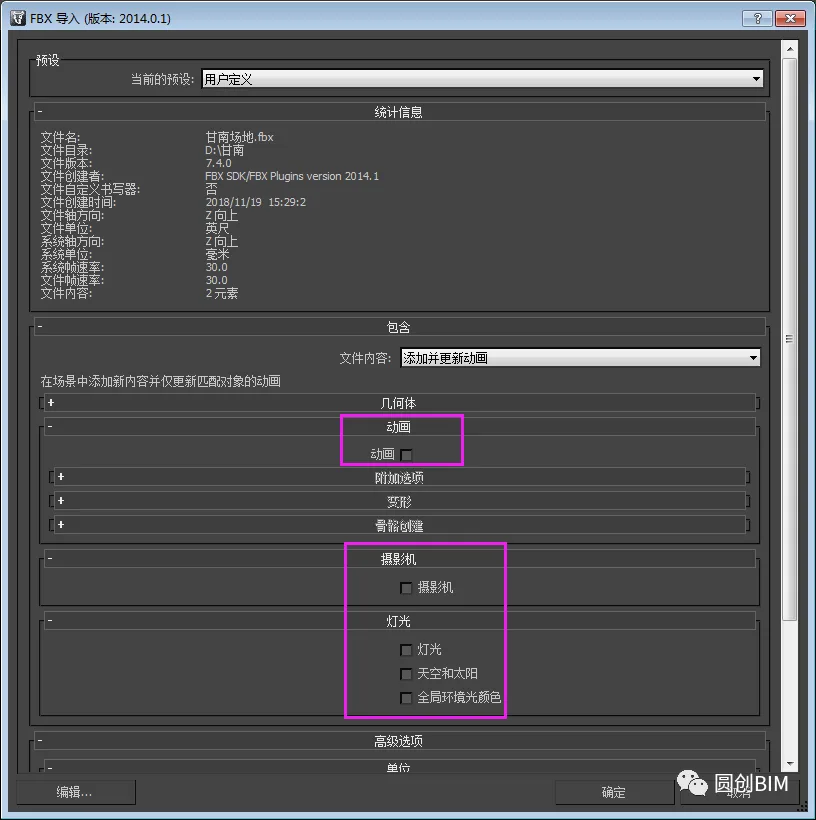
3ds Max Import Notes for FBX Files:
Attention when Importing DWG Files:
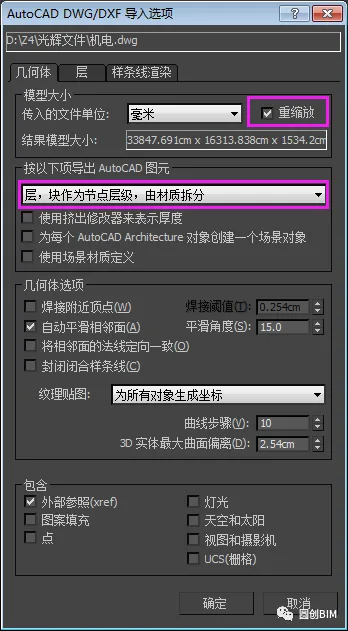
3. Model Organization and Optimization
Once imported into 3ds Max, models require optimization and organization. First, select all components and convert them to mesh objects. Then, delete all auxiliary objects from the selection list. These steps must be done in order to avoid losing components.
Because BIM models often include all building components, they can be very large and cause lag on most computer systems, severely impacting efficiency. To alleviate this, select all components sharing the same material and collapse them into a single object. Repeat this for all materials to reduce the model’s complexity significantly.
Next, assign 3ds Max standard materials to these grouped models and apply UV coordinates, typically using rectangular prisms sized 1m x 1m x 1m.
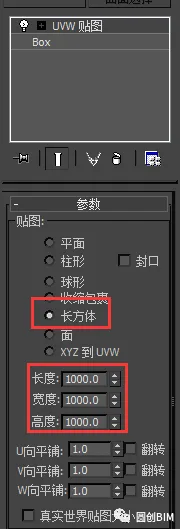
4. 3ds Max Export Settings
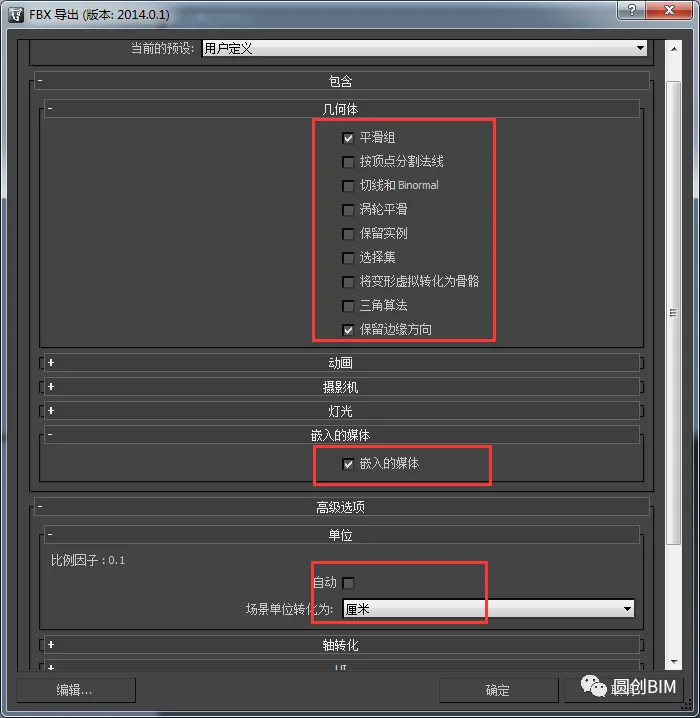
Mars software currently supports FBX and SKP file formats, with FBX preferred due to more accurate data transfer between 3ds Max and Mars. Below are export settings to note when exporting FBX files:
Solving Model Import Issues in Mars Software
Model Import Failure:
Common causes for failed imports include:
- Incorrect export settings in 3ds Max — review export procedures carefully.
- Excessively large model size due to numerous building components exported from Revit. Model optimization and simplification are necessary before import, as covered in the previous section.
Model Not Found After Import:
- Coordinate issues: If the Revit model was not built at the origin and coordinates are not reset in 3ds Max, the model may be misplaced. Reset coordinates to zero before import.
- Unit mismatch: Mars uses centimeters by default, while Revit uses millimeters. Ensure unit consistency during export to avoid scaling errors.
Surface Errors in Imported Models:
- Verify if the model is an editable polygon; if so, convert it to a mesh before importing into Mars.
- If already a mesh, isolate problematic components into smaller elements until errors are resolved.
Texture Issues:
- Textures may not apply if standard materials were not assigned in 3ds Max and Revit’s native materials remain.
- Texture distortion occurs if UV mapping is missing or UV sizes are inappropriate; UVs should be sized uniformly (1m x 1m x 1m).
- Some textures may fail to display if their size exceeds Mars’ maximum of 8000 x 8000 pixels; reduce texture sizes in 3ds Max accordingly.
Tips for Using Mars Software
Coordinate Reset: After importing, reset model coordinates to zero. This simplifies merging multiple models later.
Model Grouping: Avoid collapsing all models into one in Mars software. Instead, group components that change frequently (e.g., civil engineering, interior decoration, doors, and windows). This allows modifying and reimporting only relevant groups, saving time and reducing errors.
Efficient Use of the Resource List: Organizing scene elements by layers helps improve workflow efficiency.
Custom Components: Combine frequently used components like interior decorations or landscape elements into custom components for reuse across projects, enhancing productivity.
Lighting: Mars lacks linear light sources. Use point lights scaled along a single axis to simulate light strips, adjusting orientation as needed for indoor lighting effects.
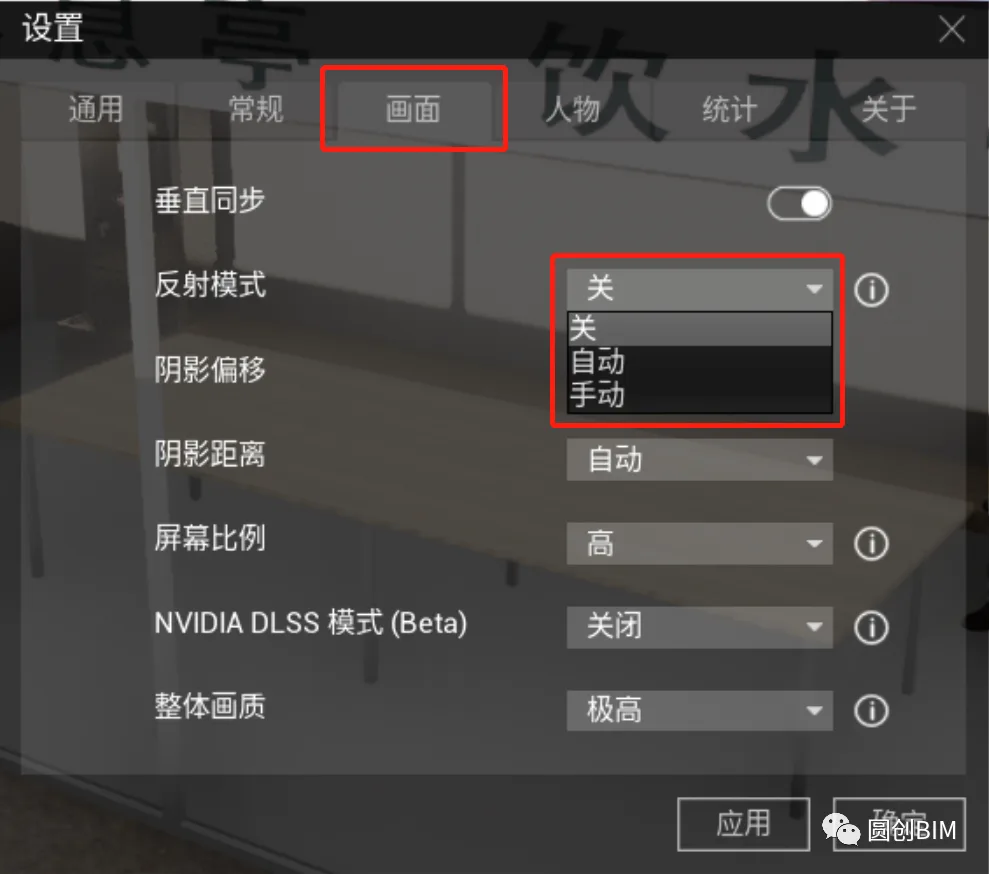
Reflection Control: Mars calculates reflections based on the current position and environment, generating HDRI environment maps and assigning materials.
For scenes with large reflective surfaces, switch reflection mode to manual. Refresh reflections using Ctrl+R, enabling fine-tuning of light, shadow, and color to optimize the effect for both reflective surfaces and the scene.
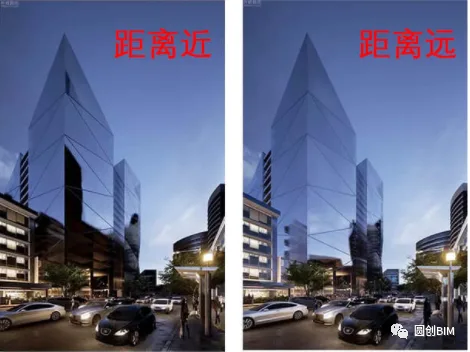
The texture balls in Mars differ from traditional software: color adjustments add on top of the base material color rather than changing it directly. When assigning materials, select colors close to the desired tone for better results.
Custom materials can be saved for reuse in future projects. Rather than exporting materials from modeling software, create and assign custom materials within Mars for consistency and efficiency.
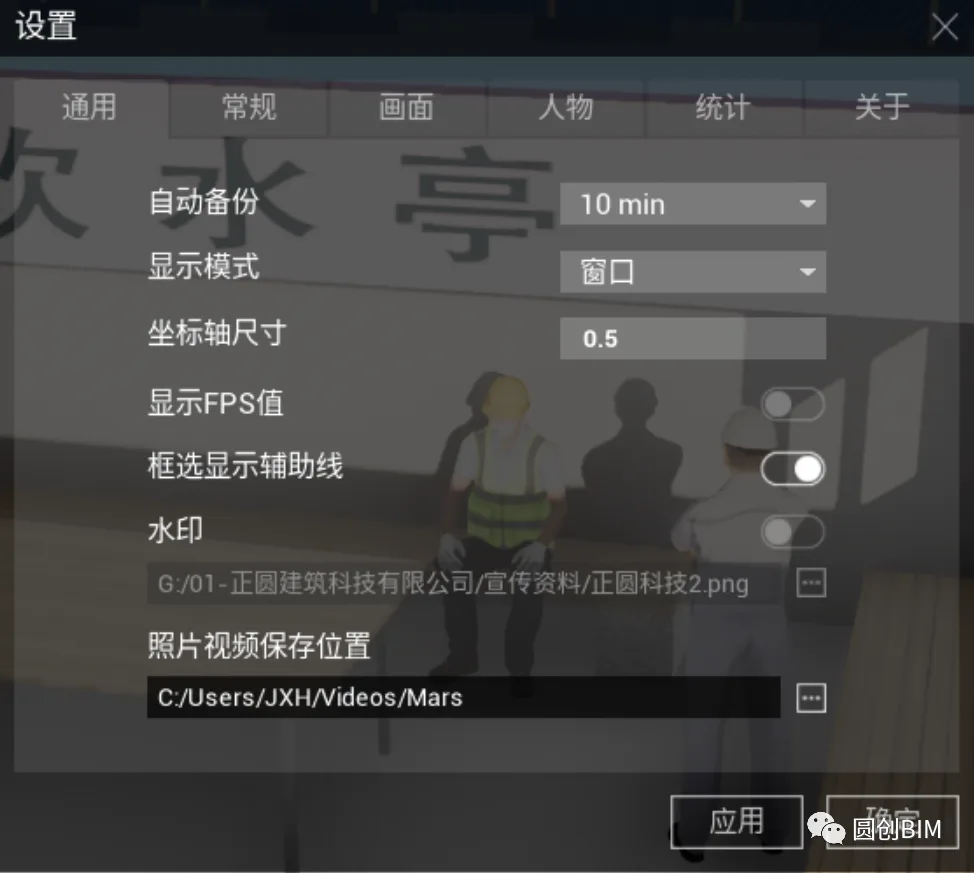
The default watermark in Mars software is the Radiant City icon. Users can disable the watermark in settings or create custom watermarks using Photoshop. Ensure the PNG watermark image fills the entire area to avoid a small watermark display. Import the custom watermark as illustrated below.
Summary and Outlook
This article outlines the current workflow for integrating BIM models with Mars software, analyzes common challenges encountered, and offers practical solutions.
As BIM technology and real-time rendering software continue to advance, interactive integration features will become more seamless. Data exchange between BIM models and real-time rendering tools will improve, eliminating the need for intermediary software like 3ds Max. This will simplify the production process, lower technical barriers, and enhance realism.
Professionals in the BIM and construction industries should proactively familiarize themselves with emerging software to stay ahead.
We hope this introduction to the combined use of BIM models and Mars software proves helpful.
Thank you for reading! See you in the next issue~
















Must log in before commenting!
Sign Up