
To analyze Revit models using Navisworks, the first step is to convert the Revit file into the NWC format. There are two ways to perform this conversion: you can either export the Revit file directly as an NWC file, or use the external tools available in the add-ons to convert and open the file in Navisworks. Figure 1 illustrates these two methods:
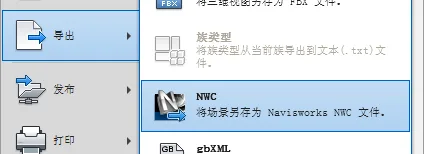
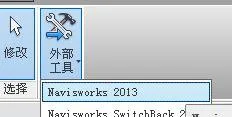
For collision detection, Autodesk Navisworks Manage 2013 is used here. The detection methods fall into two categories:
1. Selecting Local Graphic Elements for Detection
If you want to perform collision detection on specific local elements within a project, start by selecting the elements you want to check. Then, select the elements that might collide with them, or choose elements across the entire project. After selecting these elements, click on Clash Detective to run the collision detection.
2. Overall Graphic Collision Detection
To run collision detection across the entire project, open Clash Detective in the view, add a test, select all projects in both groups A and B, and then execute the test. The software will then check for clashes across all disciplines in the project and display the number of collision points found. If you want to export the results, use the Write Report command to generate a report in XML or HTML format.
Compared to traditional pipeline coordination on 2D drawings, using Revit MEP for pipeline coordination offers a clear 3D visualization. It allows for quick and precise identification and resolution of conflicting elements, significantly improving both the efficiency and accuracy of pipeline coordination. This ensures higher quality in project design and construction.
Additionally, Navisworks allows third parties to perform walkthroughs within the project, enabling them to freely navigate the model.
After detecting collisions with Navisworks, make the necessary modifications in Revit. Adjust the elevation of each discipline at the collision points according to the relevant avoidance principles.
Navisworks detects many types of collisions—not only between pipelines but also design errors, such as drainage pipes running under rolling shutter doors. Detecting and correcting these issues through Navisworks enhances the overall accuracy of the design.
















Must log in before commenting!
Sign Up