
The updated “Green Building Evaluation Standard” GB/T50378-2014 includes numerous requirements related to physical aspects such as building energy efficiency and both indoor and outdoor environmental conditions. During green building assessments, simulation analyses and supporting data reports must be provided. The Building Information Model (BIM) encompasses all design details of the building, enabling efficient data transfer and utilization throughout the simulation process. Additionally, incorporating meteorological and geographic data into Ecotect can enhance relevant simulation analyses, improving both work efficiency and information use. Common data formats for exchanging information between BIM core modeling software and energy-saving tools include GBXML and DXF.
Overview of GBXML and DXF Data Formats
GreenBuildingXML (gbXML) was developed by Bentley Systems in 2000 to streamline data exchange among various building software applications. This standard specifies detailed and long-term requirements for data storage and transmission. Most widely used core modeling software today supports the gbXML format, and the Ecotect green analysis software referenced here also fully supports this standard.
Drawing Exchange Format (DXF), created by Autodesk, is a graphics data exchange format designed to overcome limitations found in DWG files. Over recent years, DXF has become an internationally recognized standard for graphics data exchange and is supported by the majority of CAD systems.
Comparing Data Exchange and Usage: GBXML vs. DXF
The gbXML format represents a space-based model where the building’s enclosure elements—such as roof, interior and exterior walls, floor slabs, windows, doors, and openings—are expressed as surfaces without detailed component-level data. However, this format still includes comprehensive component information.
In contrast, DXF files consist of detailed 3D models with thick components. While they contain input data, DXF files often require additional physical information to be added. Moreover, exporting or importing DXF files between Revit and Ecotect tends to be slower compared to handling simpler models. The typical data exchange process is illustrated below:
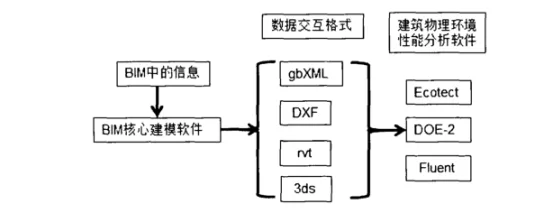
Ecotect 2011 supports data exchange with Revit, but this transfer is not bidirectional. In other words, Revit models can be imported into Ecotect for simulation and analysis, but data from Ecotect can only be copied or exported as DXF files for reference within Revit. When transferring data from Revit to Ecotect, the gbXML format is primarily used for analyses related to thermal, lighting, acoustic environments, and solar radiation. Meanwhile, the DXF format is better suited for lighting studies, shadow obstruction analysis, visibility assessments, and similar tasks.
















Must log in before commenting!
Sign Up