
The BIM construction analysis platform is designed to enhance the application of BIM models by integrating 3D and 4D information throughout the design and construction phases. The 3D information model includes the basic attribute data of all components, while the 4D construction information model builds upon this by adding construction process details such as progress, quality, and safety during the construction stage. This platform integrates multiple software tools to achieve comprehensive digital management of bridges. The main functions of the BIM construction analysis platform are illustrated in the figure below.
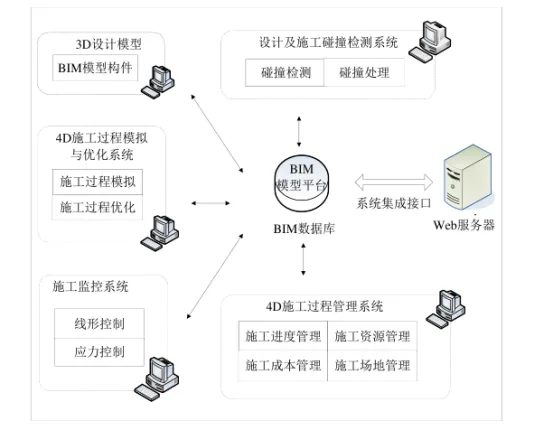
1. BIM-based 3D Information Modeling Platform
By using software such as Revit (for architecture, structure, and MEP) and Rhino, parametric 3D models of various components and mechanical equipment are created. These models are coordinated within a unified coordinate system to enable collaborative design, parametric adjustments, and visual modeling. The 3D model clearly presents the three-dimensional representations of bridge components and related construction equipment, allowing for effective visual management and easy querying of model data. This BIM information model serves as the core foundation for lifecycle management and supports virtual construction technologies in later phases.
2. BIM-based 4D Construction Information Modeling Platform
Bridge construction simulation primarily relies on Navisworks Manage, a construction visualization and analysis software. This 4D construction platform integrates design data from various software into a single model to perform clash detection and optimize designs. It also supports 4D construction simulation, engineering analysis, information exchange, and construction management throughout the process.
2.1 Collision Detection Sub-Information Model
The model is imported into Navisworks to create a collision detection sub-information model. Using the Clash Detective tool, the software performs clash detection and conflict analysis to identify potential construction clashes early. Designers can visually inspect and quickly locate clashes in 3D, analyze inspection results, and collaborate with design and installation teams to adjust and optimize the design. This process is repeated until all conflicts are resolved, significantly reducing the risk of design errors.
2.2 Construction Process Sub-Information Model
The 3D model is segmented into individual components. Using Navisworks Manage, a virtual construction platform is built by linking external scheduling data to these components, effectively adding a time dimension. This transforms the 3D model into a 4D information model that reflects the construction sequence. Considering other influencing factors, the entire construction process can be visualized and dynamically simulated.
The 4D simulation proceeds as follows: develop a BIM parametric model of building components → create a simulation schedule based on the project timeline → view the model according to the schedule → build parametric BIM models for temporary facilities and construction equipment → import the schedule and link it to the model → generate a complete 4D construction information model → integrate resource and site data → dynamically simulate the construction process → export the simulation results. If spatial conflicts arise during simulation, the model is adjusted and refined until the simulation runs smoothly.
















Must log in before commenting!
Sign Up