

Lumion Pro is a powerful 3D visualization and rendering software specialized for architectural landscapes. With Lumion 6.0, users can easily design realistic landscape models with intuitive operation and fast rendering speeds. It supports importing models from SketchUp, Autodesk, and other popular design software.
Image quality plays a crucial role in evaluating rendering software. Lumion 6 has significantly enhanced its materials, reflections, shading, and lighting capabilities. These improvements have upgraded Lumion’s rendering engine, producing results that are more convincing and authentic than ever before.
Key Features:
- Rendering and scene creation are reduced to just a few minutes.
- Supports importing 3D content from Autodesk and other 3D software packages.
- Includes new 3D models and materials.
- Utilizes lightning-fast GPU rendering technology for real-time 3D scene editing.
- Create stunning videos using the built-in video editor.
- Export HD MP4 files, stereoscopic videos, and high-resolution images for print.
- Enhanced special effects, including the ability to add various graphic and textual content to movies.
- Direct support for SKP files.
- Brand new 360-degree panoramic rendering with cloud synchronization support.
Workflow Improvements:
1. Faster Rendering Speed
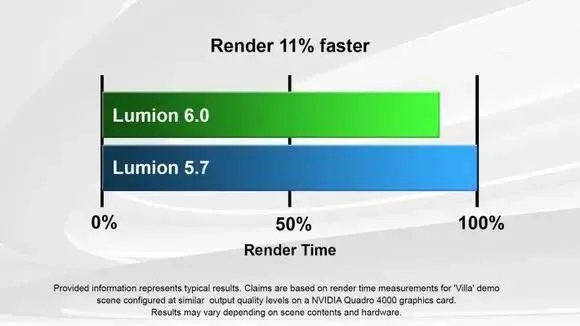
Rendering speed is critical in visualization workflows. Thanks to engine optimizations, Lumion 6 renders faster than Lumion 5, with testing showing an 11% reduction in rendering time. This is impressive, considering Lumion already offers some of the fastest building rendering options available. Speed is one of Lumion’s key advantages and a major reason users appreciate it.
Lumion 6 also continues seamless integration with popular 3D modeling software such as Trimble SketchUp®, Autodesk Revit®, Nemetschek Allplan®, Vectorworks®, ArchiCAD®, and Autodesk 3ds Max®.

2. Enhanced Scene Effects
Scene styling is a vital tool for professionals, helping to highlight specific image areas much like a high-end camera lens effect. Lumion 6 features improved depth of field effects, allowing you to easily focus on a subject with blurred backgrounds. You can choose from circular, hexagonal, or six other bokeh shapes in the focal area. The new dynamic autofocus keeps focus on a fixed point even when the camera moves—though Lumion’s built-in autofocus has historically been challenging to use, this update promises improvements.

This is not a photograph but a real Lumion effect, demonstrating its impressive realism.

3. Autumn Effect

Lumion 6 introduces a new effect to quickly manipulate plant colors, perfect for creating vibrant autumn landscapes. By adjusting sliders, you can add stunning color variations to vegetation. This is particularly useful as Lumion previously had issues with color overflow on plants, requiring tedious manual adjustments.
4. Animated Spotlight Color Effects
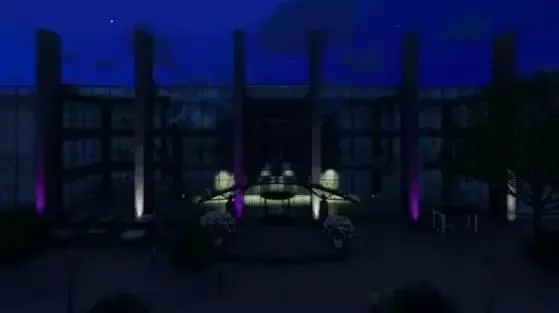
This effect lets you enhance light sources with vibrant colors and animated lighting in all the colors of the rainbow. Use it to brighten scenes, change lighting colors, and create unique moods with dynamic color transformations.
5. Foam Effect

For artistic expression, Lumion 6 offers a foam effect that can make your designs appear soft and foamy. You can customize the softness and color of this effect to achieve the desired look. This is especially useful for students or designers who want to showcase glass wall materials or abstract concepts without placing full buildings in scenes.
6. More Realistic Sky

The default sky in Lumion 6 has been improved over Lumion 5, offering more realistic colors and effects. Nighttime scenes and sunsets now feature impressive, atmospheric skies and clouds with natural hues. Achieving this effect is simple—just use the slider controls, and Lumion handles the rest, delivering beautiful, realistic skies.
Installation and Crack Instructions:
Run Lumion_6_0.exe to install the software.
Copy the three DLL files from the crack/hack folder to C:Program FilesLumion 6.0Channels.











When will Lu9 be available