
Real-Time Online Updates for the Cloud Family Library
Component Dock is a platform—both a plugin and a website—that offers free downloads of Revit family libraries and efficient component management tailored for BIM engineers.
Each time users launch the application, they gain access to real-time updates on components, parameters, 3D online previews, and other valuable services. The official Revit plugin is deeply integrated into modeling workflows.
Our mission is to enhance the productivity of BIM design engineers by building a top-tier BIM component library and delivering high-quality services in China.
Extensive Component Library, Always Free
Installation takes just 3 seconds—no registration required. Simply open Revit to start using it.
All website components are seamlessly integrated within the plugin, allowing you to load items into your project with a single click.
Searching for families during Revit modeling is effortless, doubling your efficiency instantly.
Guanglian Dazu Library Plugin – Component Dock Installation and Usage Guide
Step 1: Install the Component Dock plugin. Ensure Revit software is installed beforehand.
Supported Revit versions: 2014 through 2019.
Step 2: Install the Component Dock plugin.
After installation, open Revit. You will find the Component Dock tab added to the Revit ribbon.
Step 3: Open any project.
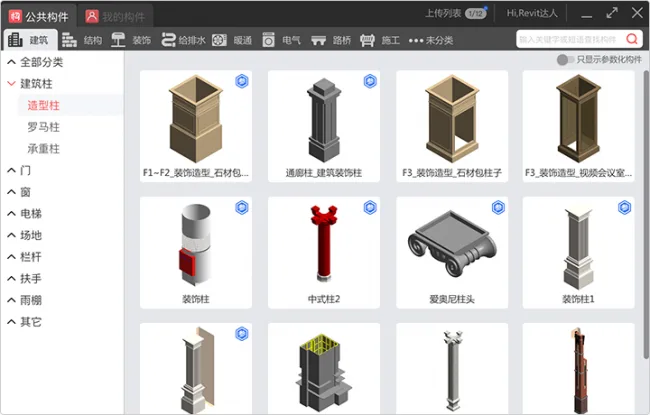
Click the Public Components button and select any family layout from the pop-up window.
Design Assistance Tools Boost Modeling Efficiency by 10x
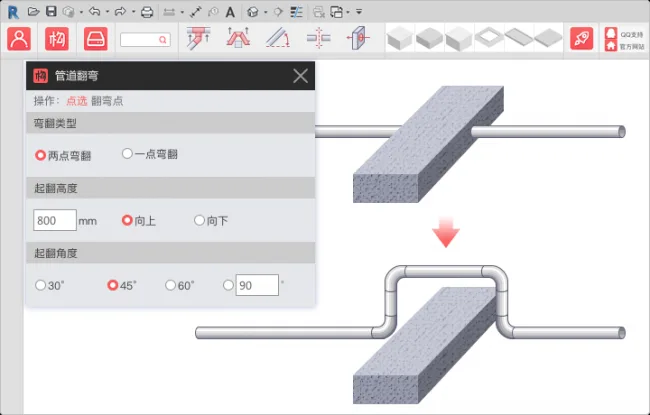
Bending Tool: Say goodbye to complexity with one-click bending that complies with construction standards and offers higher accuracy.
One-Click Hole Creation: Easily create holes in walls, beams, and slabs—supporting both single and combined openings—with a simple, intuitive operation.
Pipeline Connection: Connect pipelines effortlessly with one click, even in complex scenarios, ensuring true pipeline connectivity.
Private Personal Component Space — Secure and Reliable
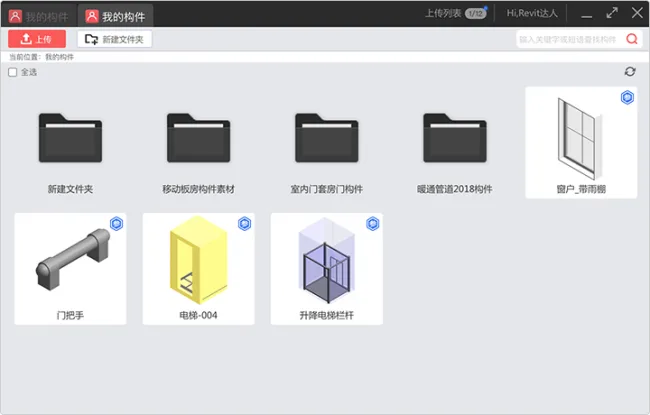
Upload RFA files and folders to your private space without changing their structure or quantity limits.
Save frequently used components in your personal space for quick access and easy import.
Enjoy one-click cloud backup and personalized component management.
Note:
– When no file is open, Component Dock cannot arrange families temporarily.
– Family layout is supported in 3D views, plan views, and layout functions within projects, with ongoing development.
– If you encounter login issues, please download the Component Dock group file and install the system patch.
– Currently, an internet connection is required to run the plugin.











How to download this plugin
It can be downloaded and used directly.