
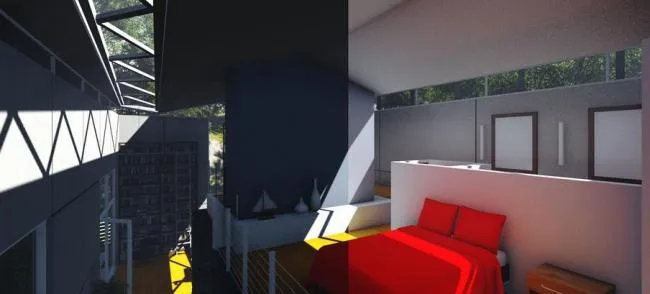
Lumion 5.0 is a professional 3D visualization software that combines terrain creation, atmospheric effects, material editing, animation rendering, and video editing into one intuitive package. Its real-time display feature lets you see the final results instantly, without any waiting for rendering.
Widely used in architecture, urban planning, and design, Lumion excels in creating stunning movies and still images. It offers advanced graphic rendering, realistic landscapes, night lighting effects, and high-performance output. Users can even create immersive virtual reality scenes directly on their computers, benefiting from fast rendering speeds that significantly reduce production times. The software demo highlights how quickly you can produce impressive architectural visualizations. Download and try it today!
Software Features
1. Materials
Lumion 5 introduces a new material category: plastic. This adds 120 new materials, bringing the total to 600. All materials have been upgraded to use Physically Based Rendering (PBR), a technique that simulates realistic light interaction with surfaces based on physical principles, resulting in lighting effects comparable to those from industry-standard rendering engines like V-Ray.
2. Rendering Effects
New artistic effects, including oil painting and crayon sketching, have been added to boost your creative possibilities.
3. Workflow
The software offers versatile tools to quickly populate scenes with characters arranged along paths or within defined areas.
4. Lighting
A new volumetric lighting system delivers effects similar to those in modern 3D games, replacing the older cloud-based lighting with more realistic volumetric light.
Feature Overview
- Rendering and scene creation completed in just minutes
- Supports importing 3D models from Google SketchUp, Autodesk products, and many other platforms
- Includes new 3D models and material libraries
- Real-time scene editing powered by ultra-fast GPU rendering
- Built-in video editor for creating compelling videos
- Export options include HD MP4, stereoscopic videos, and high-resolution images
- Supports on-site demonstrations
Installation Guide
- Download Lumion 5.0, which includes 6 installation files and 1 registration tool.
- Run
Lumion_5_LUM5PRO-HS Architects.exeto start the installation and click “Next”. - The software size is about 14GB; select your preferred installation directory and continue.
- Choose whether to create a desktop shortcut, then proceed.
- Click “Install” and wait for the installation to finish.
- Navigate to
C:WindowsSystem32driversetc, find the “HOSTS” file, right-click it and open with Notepad. - Add the following lines to the file and save it to avoid license issues when online:
127.0.0.1 localhost

127.0.0.1 lm.licenses.adobe.com - Open the Lumion 5.0 registration tool, click “PATCH”, confirm with “Yes”, then apply the patch using the authorization file located in the Channels folder inside the installation directory (default path:
C:Program FilesLumion 5.0Channels).
Materials Overview
New Physically Based Materials
High-quality materials are crucial for realistic visualizations. Lumion 5’s updated library features 123 new materials, totaling over 648 options. Every material now follows physical properties for authentic surface-light interactions thanks to PBR technology. New categories like plastic, leather, and stone have been added, alongside expanded selections in existing categories. The material editor interface has also been redesigned for easier navigation and selection.
New Material Interface
Adjusting materials has been simplified with a redesigned, user-friendly editor inspired by the “PureGlass” UI. This streamlines complex adjustments for a smoother and more enjoyable experience.
Expanded Artistic Effects
Lumion 5 introduces new filters similar to Photoshop, including oil painting, powder painting, analogue color lab, blueprint, and material highlight effects.
Workflow Enhancements
Mass Placement
This feature enables quick creation of large scenes by drawing lines or areas where objects automatically populate. You can control object density, rotation, variation, and quantity—ideal for creating traffic flows, forests, gardens, or crowds.
Mass Movement
Add dynamic motion to large groups of objects by defining paths they follow. When combined with mass placement, this simulates traffic or crowd movement at varying speeds.
Support for 100 Static Photos
Lumion 5 now supports up to 100 static photos simultaneously, up from 10. This lets you capture multiple angles without needing to delete previous shots.
Water Plane Reflections
Horizontal reflections on water surfaces have been added, greatly enhancing scene realism.
New Trees and Plants
The software includes 87 new tree species and 103 new plant varieties from around the globe, totaling 1,000 high-quality vegetation models. This allows users to add authentic local character to their environments.
Volumetric Sunlight
This effect simulates sunlight scattering through dust particles in the air, creating a dramatic “God rays” effect. Easily adjustable via a slider, it can be applied indoors or outdoors to add atmospheric depth and improve scene quality.
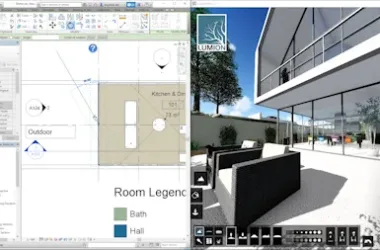
Software Screenshot











Must log in before commenting!
Sign Up